


In this short post, we will learn how to build and push a docker image to Amazon ECR using Github actions.
Amazon ECR les you easily store, share, and deploy your container software anywhere. If you have an application that needs to dockerized and deployed using AWS then you might need to store the image in ECR repositories. Once you have a docker image in the ECR repo, you can use it to deploy your application using different AWS services such as AWS Fargate or AWS Lambda.
Let us get started and learn how it can be done.
Step 1: Create a Dockerfile for the application
Let us assume you have a simple python script called main.py and a requirements.txt file. Let us define a Dockerfile to dockerize the application.
FROM python:3
ADD requirements.txt /
RUN pip install -r requirements.txt
ADD main.py /
CMD [ "python", "./main.py" ]
For more details on how to dockerize a python script refer to this post.
Step 2: Create AWS Credentials
Make sure that you have a set of access key and secret configured. Follow this tutorial to generate AWS access key and secret.
Step 3: Create a ECR repository
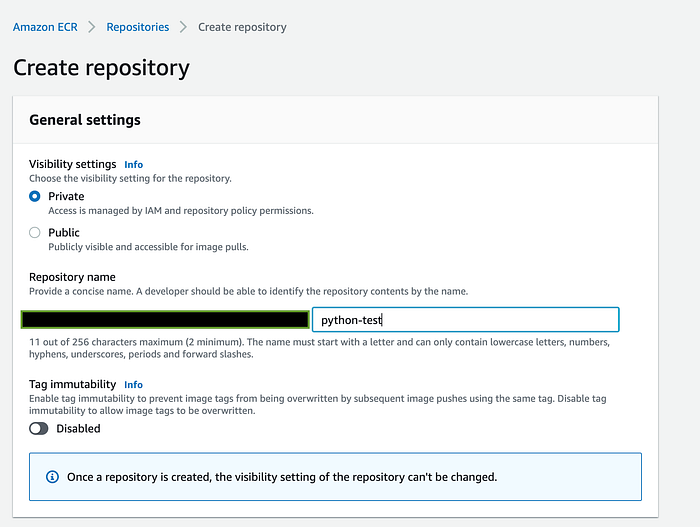
Head over to the Amazon ECR in the AWS console and click on Create repository to create a new repository.
https://us-west-2.console.aws.amazon.com/ecr/repositories?region=us-west-2
Keep the repository private and provide a name for the repo (for eg., python-test) and finally click on Create repository to confirm.
Step 4: Add Github Actions secrets
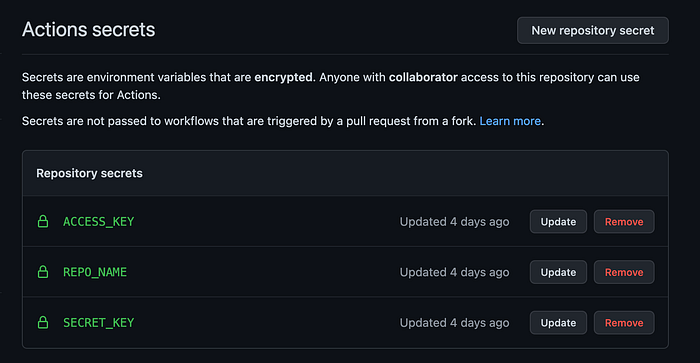
In the Github repository head over to Settings > Secrets > Action Secrets and add the following secrets.
ACCESS_KEYobtained from step 2.SECRET_KEYobtained from step 2.REPO_NAMEobtained from step 3.
Step 2: Create a Github actions config file
Next, let us create a .github/workflows directory in the root of the project. And add a file called aws-ecr.yml in it with the following contents.
The above script checks out the code, configures AWS credentials, logins to ECR before building & pushing the docker image. It uses the commit hash as the image tag.
Note:
on
mainbranch auto deployments will happen
It uses AWS credentials and repo name from the action secrets
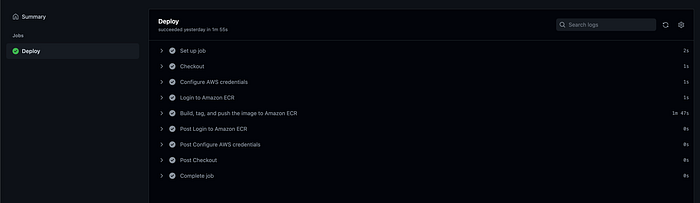
Push the code to the main branch and a build should be trigged automatically. Head over to the Actions tab in the repo and check for the last job status. You should be able to see a successful job.
Finally, head over to the ECR repo. You should be able to see a new Docker image uploaded to it with its image tag matching the commit hash.
That's it for this post. Checkout other AWS ECR + Docker related articles.
Please leave a clap if you found the post to be helpful. Consider taking a Medium membership to continue reading all my premium articles along with 1000s of other stories.