


This article can be treated as an expansion of previous bigger database benchmark.
Because PostgreSQL was the winner, it would be interesting to make a comparison running PostgreSQL in Docker versus running PostgreSQL natively. And it would be also interesting to know, if there are differences between fine-tuned database settings, using PGTune.
This benchmark was done on all three major systems, running PostgreSQL natively. And on all of them, running PostgreSQL in Docker.
The goal of this benchmark is not to compare Linux versus Windows versus Mac (but you will get the results). The goal is to compare PostgreSQL running in Docker versus running natively.
Fine tuning the database in Docker using PGTune
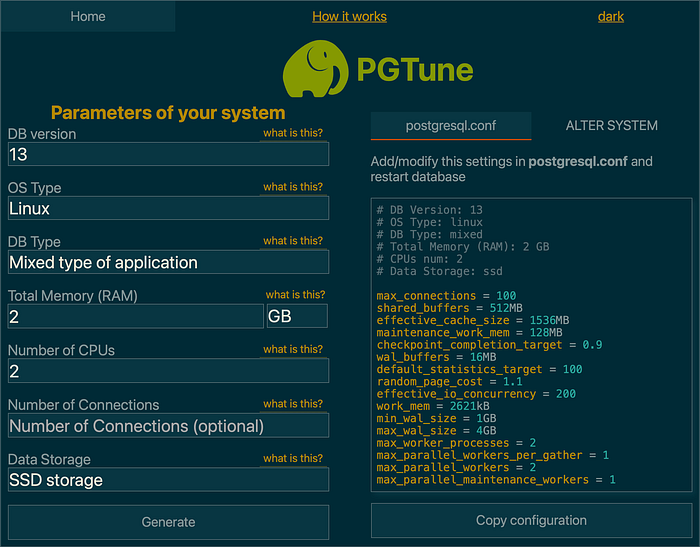
PGTune is an online tool that can generate a slightly better configuration for your PostgreSQL database. I tested them all for database running in Docker. Below are parameters, that match my Docker settings: 2 GB of RAM and 2 CPU's.
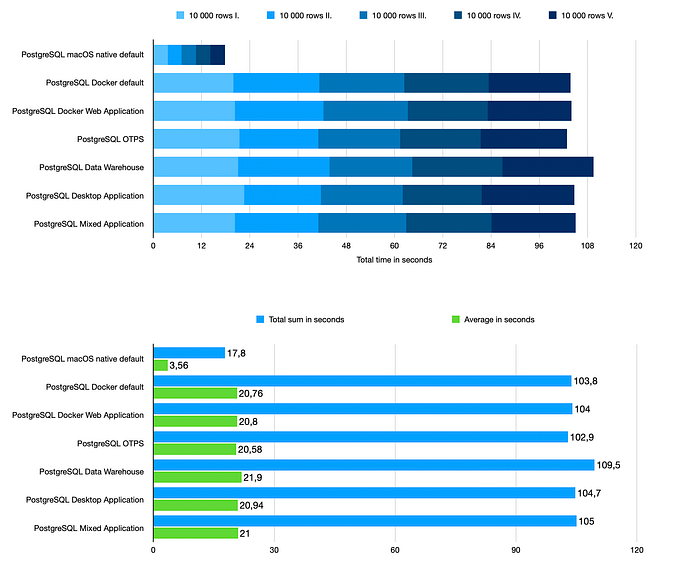
MacOS write benchmark (MacOS 11.1 Big Sur)
I used the same benchmark tool as before.
Here are the results.
Running PostgreSQL natively does affect write speed a lot. And this is expected, because PostgreSQL, running in Docker on macOS, is using virtual hard-drive.
Tuning database settings doesn't affect this particular write benchmark a lot. On the other side: if you tune those settings, you won't do anything wrong.
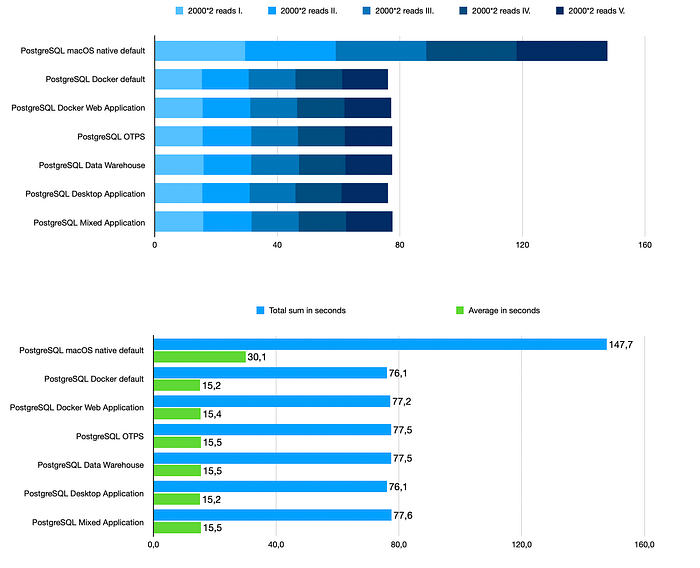
MacOS read benchmark (MacOS 11.1 Big Sur)
When I first run this benchmark on PostgreSQL running natively on macOS, I thought something was wrong. But I did the benchmark 10 times, every time with similar results.
Seeing the results, this was a little shock for me, because I surely did not expect this. Read speeds are slower on native macOS PostgreSQL than they are on PostgreSQL, running in Docker on macOS.
And again, tinkering with settings using PGTune didn't affect this particular read benchmark a lot, so it wasn't used in upcoming tests.
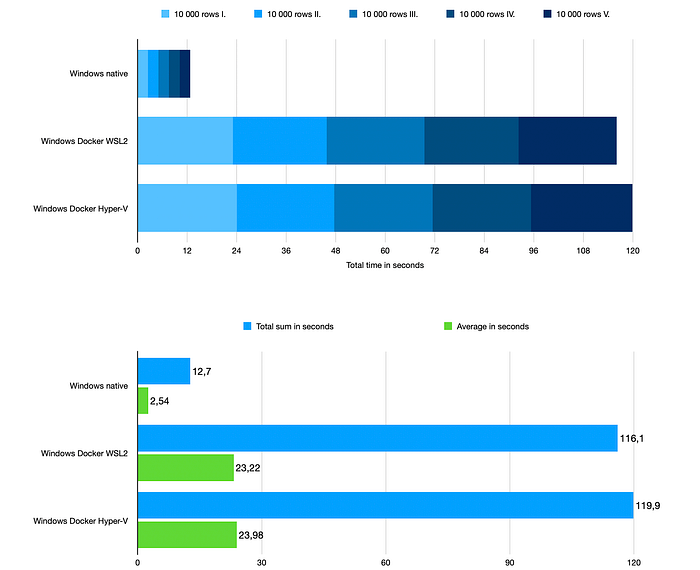
Windows write benchmark (Windows 10 Pro 20H2)
Running PostgreSQL natively does affect write speed a lot, just like on MacOS. The writes are faster by one degree.
Using WSL2 gives a slightly better results than using Hyper-V.
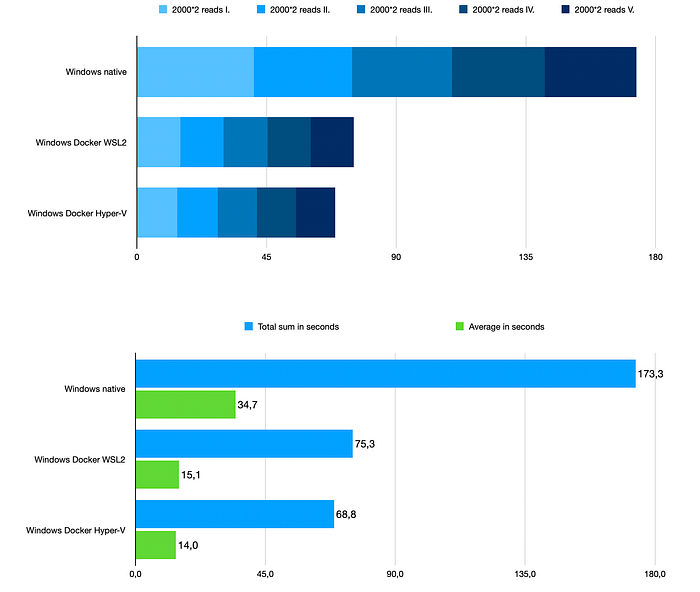
Windows read benchmark (Windows 10 Pro 20H2)
It almost mirrors the behaviour on MacOS. Reads are somehow faster, when running PostgreSQL in Docker.
Here, using Hyper-V gives a slightly better results than using WSL2.
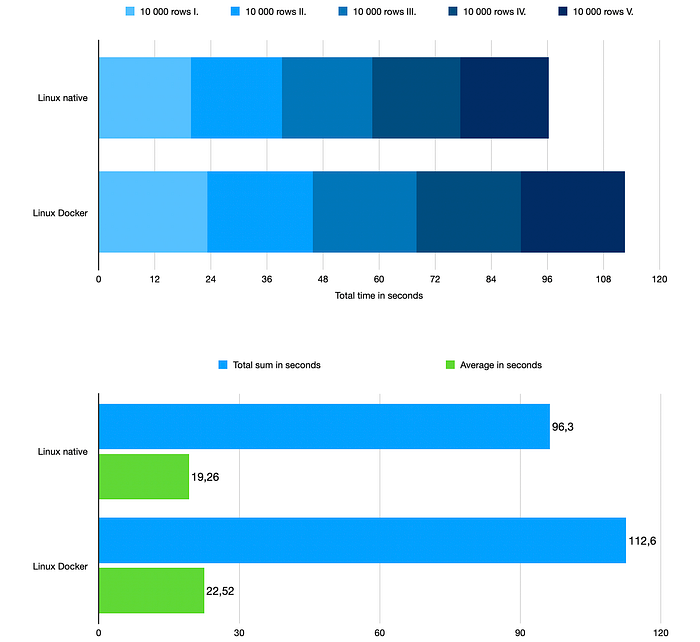
Linux write benchmark (Fedora 33)
As you can see, having PostgreSQL running in Docker slightly affects the write speed.
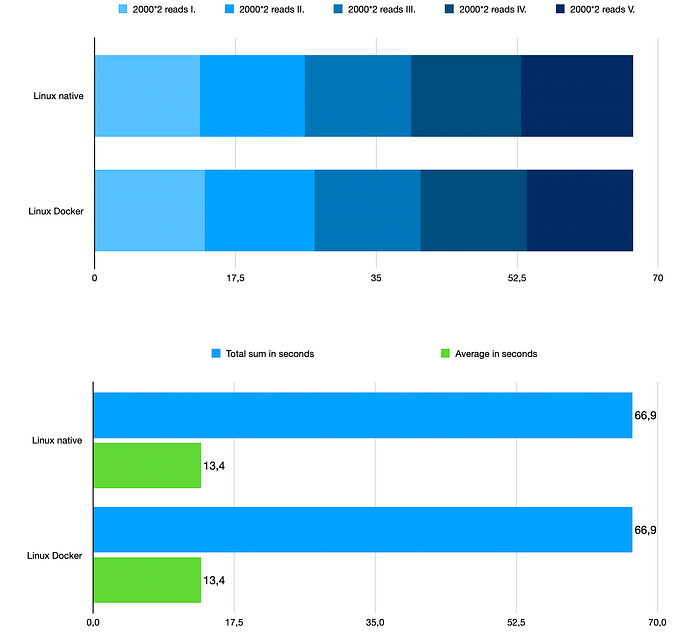
Linux read benchmark (Fedora 33)
Read speeds are identical. So from read point-of-view, it doesn't matter, if you choose to run PostgreSQL in Docker or natively, on Linux.
Interesting information
- MacOS tests were run on macbook: 16GB RAM, SSD, 2.3Ghz 8-core
- Windows tests were run on custom pc: 16GB RAM, SSD, 2.3Ghz 8-core
- Linux tests were run on custom pc: 16GB RAM, SSD, 2.3Ghz 8-core
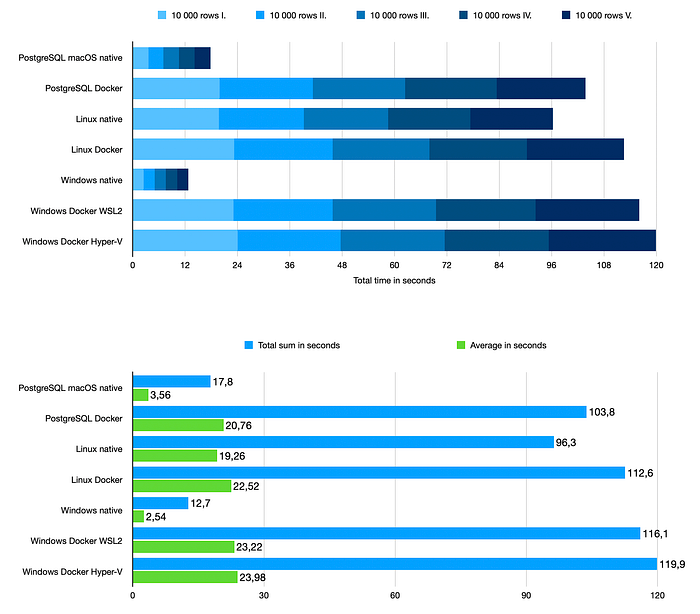
I wrote at the beginning of this article, that the goal is not to compare the systems, but I think, this comparison will give you a clearer overview.
Write benchmark
Linux is unexpectedly really slow, almost exactly, as it is slow in Docker on MacOS and in Docker on Windows.
My guess is, that the Windows and MacOS filesystem is better for writing data and because Docker on both of these systems uses Linux filesystem in virtual machine, it matches its slowliness.
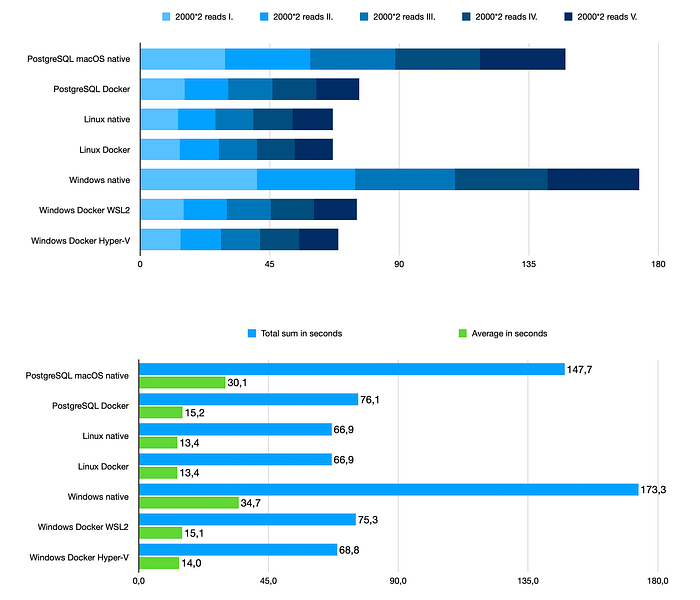
Read benchmark
Here it is exactly the opposite. Linux is fast and Windows with MacOS are much slower.
But when using Docker on both of these systems, the speed almost catches that of Linux.
My guess is exactly the same as before. Docker for MacOS and Windows matches the Linux filesystem reading speed, because it uses Linux filesystem beneath.
Conclusion for running PostgreSQL in Docker
For development: do not be afraid running PostgreSQL in Docker, either on Linux, Windows or MacOS. In case of macOS and Windows, you get better read speeds, but much more worse write speeds.
For production: that depeneds…write speed is better on native Windows, native MacOS. Read speed is better on native Linux and using Docker in general. So here, I really do not know, how to make a conclusion. You have to decide by yourself and use these results as an information.
About fine-tuning: I did not expect much from PGTune in this particular benchmark, but I advise you to test your database with different settings using PGTune, when preparing for production.