

Read this story for free: link
We are going to start with a simple RAG approach, which we all know, and then test more advanced techniques like CRAG, Fusion, HyDE, and more!
To keep everything simple…
I didn't use LangChain or FAISS
But use only basic libraries to code all the techniques in Jupyter notebook style to keep things simple and learnable.
GitHub Repo:
All the step-by-step notebooks are available here:
Codebase is organized as follows:
├── 1_simple_rag.ipynb
├── 2_semantic_chunking.ipynb
...
├── 9_rse.ipynb
├── 10_contextual_compression.ipynb
├── 11_feedback_loop_rag.ipynb
├── 12_adaptive_rag.ipynb
...
├── 17_graph_rag.ipynb
├── 18_hierarchy_rag.ipynb
├── 19_HyDE_rag.ipynb
├── 20_crag.ipynb
└── data/
    └── val.json
    └── AI_information.pdf
    └── attention_is_all_you_need.pdf
Table of contents
- Test Query and LLMs
- Technique that works best!
- Importing Libraries
- Simple RAG
- Semantic Chunking
- Context Enriched Retrieval
- Contextual Chunk Headers
- Document Augmentation
- Query Transformation
- Re-Ranker
- RSE
- Contextual Compression
- Feedback Loop
- Adaptive RAG
- Self RAG
- Knowledge Graph
- Hierarchical Indices
- HyDE
- Fusion
- Multi Model
- Crag
- Conclusion
Test Query and LLMs
To test each technique, we need four things:
- Test query and its true answer.
- PDF document on which RAG will be applied.
- Embedding generation model.
- Response and validation LLM.
Using the Claude 3.5 Thinking model, I have created a 16+ page long document on AI topic as a reference document for RAG and Attention is all you need paper to evaluate the multi model RAG. It is available in my validation data folder and is intelligently curated to test all the techniques we are going to use.
For response generation and validation, we will use LLaMA-3.2–3B Instruct to test how well a tiny LLM can perform for the RAG task.
For embeddings, we will be using the TaylorAI/gte-tiny model.
Our test query is a complex one that we will use throughout the document, and its true answer is:
test query:
How does AI's reliance on massive data sets act as a double-edged sword?

True Answer:
It drives rapid learning and innovation while also
risking the amplification of inherent biases,
making it crucial to balance data volume with fairness and quality.
(Conclusion) Technique that works best!
Instead of providing it at the end, it's better to write it at the top, After testing 18 different RAG techniques across our test query.
Adaptive RAG is the clear winner with the highest score of 0.86.
By intelligently classifying query and selecting the most appropriate retrieval strategy for each question type, Adaptive RAG shows better performance over other approaches. The ability to dynamically switch between factual, analytical, opinion, and contextual strategies allows it to handle diverse information needs with remarkable accuracy.
While techniques like Hierarchical Indices (0.84), Fusion (0.83), and CRAG (0.824) also performed admirably, Adaptive RAG's flexibility gives it the edge in real-world applications.
Importing Libraries
Let's clone my repo first so to install the required dependencies and start working.
# Cloning the repo
git clone https://github.com/FareedKhan-dev/all-rag-techniques.git
cd all-rag-techniques
Installing the required dependencies.
# Installing the required libraries
pip install -r requirements.txt
Simple RAG
Let's start with the simplest RAG. First, we will visualize how it works, and then we will test and evaluate it.

As the diagram shows, a Simple RAG pipeline works as follows:
- Extract text from a PDF.
- Split the text into smaller chunks.
- Convert the chunks into numerical embeddings.
- Search for the most relevant chunks based on a query.
- Generate a response using the retrieved chunks.
- Compare the response with the correct answer to evaluate accuracy.
First, let's load our document, grab the text, and split it into manageable chunks:
# Define the path to the PDF file
pdf_path = "data/AI_information.pdf"

# Extract text from the PDF file, and create smaller, overlapping chunks.
extracted_text = extract_text_from_pdf(pdf_path)
text_chunks = chunk_text(extracted_text, 1000, 200)

print("Number of text chunks:", len(text_chunks))


### OUTPUT ###
Number of text chunks: 42
This code uses extract_text_from_pdf to pull all the text out of our PDF file. Then, chunk_text breaks that big block of text into smaller, overlapping pieces, each about 1000 characters long.
Next, we need to turn those text chunks into numerical representations (embeddings):
# Create embeddings for the text chunks
response = create_embeddings(text_chunks)
Here, create_embeddings takes our list of text chunks and uses our embedding model to generate a numerical embedding for each one. These embeddings capture the meaning of the text.
Now we can perform a semantic search, finding the chunks most relevant to our test query:
# Our test query, and perform semantic search.
query = '''How does AI's reliance on massive data sets act
           as a double-edged sword?'''
top_chunks = semantic_search(query, text_chunks, embeddings, k=2)
Then, semantic_search compares the query embedding to the chunk embeddings, returning the most similar chunks.
With our relevant chunks in hand, let's generate a response:
# Define the system prompt for the AI assistant
system_prompt = "You are an AI assistant that strictly answers based on the given context. If the answer cannot be derived directly from the provided context, respond with: 'I do not have enough information to answer that.'"

# Create the user prompt based on the top chunks, and generate AI response.
user_prompt = "\n".join([f"Context {i + 1}:\n{chunk}\n========\n" for i, chunk in enumerate(top_chunks)])
user_prompt = f"{user_prompt}\nQuestion: {query}"
ai_response = generate_response(system_prompt, user_prompt)
print(ai_response.choices[0].message.content)
This code formats the retrieved chunks into a prompt for a large language model (LLM). The generate_response function sends this prompt to the LLM, which crafts an answer based only on the provided context.
Finally, let's see how well our simple RAG performed:
# Define the system prompt for the evaluation system
evaluate_system_prompt = "You are an intelligent evaluation system tasked with assessing the AI assistant's responses. If the AI assistant's response is very close to the true response, assign a score of 1. If the response is incorrect or unsatisfactory in relation to the true response, assign a score of 0. If the response is partially aligned with the true response, assign a score of 0.5."

# Create the evaluation prompt and generate the evaluation response
evaluation_prompt = f"User Query: {query}\nAI Response:\n{ai_response.choices[0].message.content}\nTrue Response: {data[0]['ideal_answer']}\n{evaluate_system_prompt}"
evaluation_response = generate_response(evaluate_system_prompt, evaluation_prompt)
print(evaluation_response.choices[0].message.content)


### OUTPUT ###
... Therefore, the score of 0.3 being not very close to the
true response, and not perfectly aligned.
hmm… the response of simple rag is below average
Let's move on to our next approach.
Semantic Chunking
In our Simple RAG approach, we just chopped the text into fixed-size chunks. This is pretty crude! It might split a sentence in half, or group unrelated sentences together.
Semantic Chunking aims to be smarter. Instead of fixed sizes, it tries to split the text based on meaning, grouping semantically related sentences together.

The idea is, if sentences are talking about similar things, they should be in the same chunk. We'll use the same embedding model to figure out how similar sentences are.
# Splitting text into sentences (basic split)
sentences = extracted_text.split(". ")

# Generate embeddings for each sentence
embeddings = [get_embedding(sentence) for sentence in sentences]

print(f"Generated {len(embeddings)} sentence embeddings.")


### OUTPUT ###
233
This code splits our extracted_text into individual sentences. Then create embeddings for each individual sentence.
Now, we'll calculate the similarity between consecutive sentences:
# Compute similarity between consecutive sentences
similarities = [cosine_similarity(embeddings[i], embeddings[i + 1]) for i in range(len(embeddings) - 1)]
This cosine_similarity function (which we defined earlier) tells us how similar two embeddings are. A score of 1 means they're very similar, and 0 means they're completely different. We calculate this score for each pair of adjacent sentences.
Semantic chunking is deciding where to split the text into chunks. We'll use a "breakpoint" method. We use the percentile method here, looking for big drops in similarity:
# Compute breakpoints using the percentile method with a threshold of 90
breakpoints = compute_breakpoints(similarities, method="percentile", threshold=90)
The compute_breakpoints function, using the "percentile" method, identifies points where the similarity between sentences drops significantly. These are our chunk boundaries.
Now we can create our semantic chunks:
# Create chunks using the split_into_chunks function
text_chunks = split_into_chunks(sentences, breakpoints)
print(f"Number of semantic chunks: {len(text_chunks)}")


### OUTPUT ###
Number of semantic chunks: 145
split_into_chunks takes our list of sentences and the breakpoints we found and groups the sentences into chunks.
Next, we need to create embeddings for these chunks:
# Create chunk embeddings using the create_embeddings function
chunk_embeddings = create_embeddings(text_chunks)
Time to generate a response:
# Create the user prompt based on the top chunks
user_prompt = "\n".join([f"Context {i + 1}:\n{chunk}\n=====================================\n" for i, chunk in enumerate(top_chunks)])
user_prompt = f"{user_prompt}\nQuestion: {query}"

# Generate AI response
ai_response = generate_response(system_prompt, user_prompt)
print(ai_response.choices[0].message.content)
And finally, the evaluation:
# Create the evaluation prompt by combining the user query, AI response, true response, and evaluation system prompt
evaluation_prompt = f"User Query: {query}\nAI Response:\n{ai_response.choices[0].message.content}\nTrue Response: {data[0]['ideal_answer']}\n{evaluate_system_prompt}"

# Generate the evaluation response using the evaluation system prompt and evaluation prompt
evaluation_response = generate_response(evaluate_system_prompt, evaluation_prompt)

# Print the evaluation response
print(evaluation_response.choices[0].message.content)


### OUTPUT
Based on the evaluation criteria,
I would assign a score of 0.2 to the AI assistant response.
The evaluator gives this a score of just 0.2
While semantic chunking sounds good in theory, it didn't help us here. In fact, our score went down compared to simple fixed-size chunking!
This shows that just changing the chunking strategy isn't a guaranteed win. We need to be more sophisticated in our approach. Let's try something else in the next section.
Context Enriched Retrieval
We saw that semantic chunking, while a good idea in principle, didn't actually improve our results.
One problem is that even semantically-defined chunks can be too focused. They might be missing crucial context from the surrounding text.

Context-Enriched Retrieval addresses this by grabbing not just the best-matching chunk, but also its neighbors.
Let's see how this works in code. We'll need a new function, context_enriched_search, to handle the retrieval:
def context_enriched_search(query, text_chunks, embeddings, k=1, context_size=1):
    """
    Retrieves the most relevant chunk along with its neighboring chunks.
    """
    # Convert the query into an embedding vector
    query_embedding = create_embeddings(query).data[0].embedding
    similarity_scores = []

    # Compute similarity scores between query and each text chunk embedding
    for i, chunk_embedding in enumerate(embeddings):
        # Calculate cosine similarity between the query embedding and current chunk embedding
        similarity_score = cosine_similarity(np.array(query_embedding), np.array(chunk_embedding.embedding))
        # Store the index and similarity score as a tuple
        similarity_scores.append((i, similarity_score))

    # Sort the similarity scores in descending order (highest similarity first)
    similarity_scores.sort(key=lambda x: x[1], reverse=True)

    # Get the index of the most relevant chunk
    top_index = similarity_scores[0][0]

    # Define the range for context inclusion
    # Ensure we don't go below 0 or beyond the length of text_chunks
    start = max(0, top_index - context_size)
    end = min(len(text_chunks), top_index + context_size + 1)

    # Return the relevant chunk along with its neighboring context chunks
    return [text_chunks[i] for i in range(start, end)]
The core logic is similar to our previous search, but instead of just returning the single best chunk, we grab a "window" of chunks around it. context_size controls how many chunks on either side we include.
Let's use this in our RAG pipeline. We'll skip the text extraction and chunking steps, as those are the same as in Simple RAG.
We will be using fixed-size chunks, as we did in the Simple RAG section, and we are keeping the chunk_size = 1000 and overlap = 200.
Now generate a response, same as before:
# Create the user prompt based on the top chunks
user_prompt = "\n".join([f"Context {i + 1}:\n{chunk}\n=====================================\n" for i, chunk in enumerate(top_chunks)])
user_prompt = f"{user_prompt}\nQuestion: {query}"

# Generate AI response
ai_response = generate_response(system_prompt, user_prompt)
print(ai_response.choices[0].message.content)
And finally, evaluate:
# Create the evaluation prompt and generate the evaluation response
evaluation_prompt = f"User Query: {query}\nAI Response:\n{ai_response.choices[0].message.content}\nTrue Response: {data[0]['ideal_answer']}\n{evaluate_system_prompt}"
evaluation_response = generate_response(evaluate_system_prompt, evaluation_prompt)
print(evaluation_response.choices[0].message.content)


### OUTUT ###
Based on the evaluation criteria,
I would assign a score of 0.6 to the AI assistant response.
This time, we get an evaluation score of 0.6!
That's a significant improvement over both Simple RAG (0.5) and Semantic Chunking (0.1).
By including neighboring chunks, we've given the LLM more context to work with, and it's produced a better answer.
We're still not perfect, but we're definitely moving in the right direction. This shows how important context is for retrieval.
Contextual Chunk Headers
We've seen that adding context by including neighboring chunks helps. But what if the content of the chunks themselves is missing important information?
Often, documents have a clear structure titles, headings, subheadings that provide crucial context. Contextual Chunk Headers (CCH) takes advantage of this structure.

The idea is simple: before we even create our embeddings, we prepend a descriptive header to each chunk. This header acts like a mini-summary, giving the retrieval system (and the LLM) more to work with.
The generate_chunk_header function will analyze each chunk of text and generate a concise, meaningful header that summarizes its content. This helps in organizing and retrieving relevant information efficiently.
# Chunk the extracted text, this time generating headers
text_chunks_with_headers = chunk_text_with_headers(extracted_text, 1000, 200)

# Print a sample to see what it looks like
print("Sample Chunk with Header:")
print("Header:", text_chunks_with_headers[0]['header'])
print("Content:", text_chunks_with_headers[0]['text'])


### OUTPUT ###
Sample Chunk with Header:
Header: A Description about AI Impact
Content: AI has been an important part of society since ...
See how each chunk now has a header and the original text? This is the augmented data we'll use.
Now for the embeddings. We'll create embeddings for both the header and the text:
# Generate embeddings for each chunk (both header and text)
embeddings = []
for chunk in tqdm(text_chunks_with_headers, desc="Generating embeddings"):
    text_embedding = create_embeddings(chunk["text"])
    header_embedding = create_embeddings(chunk["header"])
    embeddings.append({"header": chunk["header"], "text": chunk["text"], "embedding": text_embedding, "header_embedding": header_embedding})
We loop through our chunks, get embeddings for both the header and the text, and store everything together. This gives the retrieval system two ways to match a chunk to the query.
Since semantic_search already works with embeddings, we simply need to ensure that our headers and text chunks are both embedded properly. This way, when we perform a search, the model can consider both the high-level summary (header) and the detailed content (chunk text) to find the most relevant information.
Now, let's modify our retrieval step to return not just the matching chunks but also their headers for better context and generate response.
# Perform semantic search using the query and the new embeddings
top_chunks = semantic_search(query, embeddings, k=2)

# Create the user prompt based on the top chunks. note: no need to add header
# because the context is already created using header and chunk
user_prompt = "\n".join([f"Context {i + 1}:\n{chunk['text']}\n=====================================\n" for i, chunk in enumerate(top_chunks)])
user_prompt = f"{user_prompt}\nQuestion: {query}"

# Generate AI response
ai_response = generate_response(system_prompt, user_prompt)
print(ai_response.choices[0].message.content)


### OUTPUT ###
Evaluation Score: 0.5
This time, our evaluation score is 0.5!
By adding those contextual headers, we've given the system a better chance to find the right information, and the LLM a better chance to generate a complete and accurate answer.
This shows the power of augmenting our data before it even goes into the retrieval system. We haven't changed the core RAG pipeline, but we've made the data itself more informative.
Document Augmentation
We've seen how adding context around our chunks (with neighbors or headers) can help. Now, let's try a different kind of augmentation: generating questions from our text chunks.
The idea is that these questions can act as alternative "queries" that might match the user's intent better than the original text chunk itself.

We add this step between the chunking and embedding creation. We can simply use generate_questions function for this. It takes a text_chunk and returns a number of questions that can be generated using it.
Let's first look at how we can achieve document augmentation with question generation:
# Process the document (extract text, create chunks, generate questions, build vector store)
text_chunks, vector_store = process_document(
    pdf_path,
    chunk_size=1000,
    chunk_overlap=200,
    questions_per_chunk=3
)

print(f"Vector store contains {len(vector_store.texts)} items")


### OUTPUT ###
Vector store contains 214 items
Here, process_document function does it all. It takes pdf_path, chunk_size, overlap, and questions_per_chunk and returns a vector_store.
Now, the vector_store not only includes the embeddings of the document but also includes the embeddings of the generated questions.
Now, we can perform a semantic search as before, using this vector_store. We use a simple function here to find similar vectors.
# Perform semantic search to find relevant content
search_results = semantic_search(query, vector_store, k=5)

print("Query:", query)
print("\nSearch Results:")

# Organize results by type
chunk_results = []
question_results = []

for result in search_results:
    if result["metadata"]["type"] == "chunk":
        chunk_results.append(result)
    else:
        question_results.append(result
The important change here is how we handle the search results. We now have two types of items in our vector store: original text chunks, and generated questions. This code separates them, so we can see which type of content matched the query best.
The final steps, generating a context and then a evaluation:
# Prepare context from search results
context = prepare_context(search_results)

# Generate response
response_text = generate_response(query, context)

# Get reference answer from validation data
reference_answer = data[0]['ideal_answer']

# Evaluate the response
evaluation = evaluate_response(query, response_text, reference_answer)

print("\nEvaluation:")
print(evaluation)


### OUTPUT ###
Based on the evaluation criteria, I would assign a
score of 0.8 to the AI assistants response.
Our evaluation shows a score of around 0.8!
Generating questions and adding them to our searchable index has given us another boost in performance.
It seems that sometimes, a question is a better representation of the information need than the original text chunk.
Query Transformation
So far, we've focused on improving the data that our RAG system uses. But what about the query itself?
Often, the way a user phrases a question isn't the best way to search our knowledge base. Query transformations aim to fix this. We'll explore three different approaches:
- Query Rewriting: Making the query more specific and detailed.
- Step-back Prompting: Creating a broader, more general query to retrieve background context.
- Sub-query Decomposition: Breaking a complex query into multiple, simpler sub-queries.

Let's see these transformations in action. We'll use our standard test query:
# Query Rewriting
rewritten_query = rewrite_query(query)

# Step-back Prompting
step_back_query = generate_step_back_query(query)
generate_step_back_query does the opposite of rewriting: it creates a broader query that might retrieve useful background information.
Finally, sub-query decomposition:
# Sub-query Decomposition
sub_queries = decompose_query(query, num_subqueries=4)
decompose_query breaks the original query into several smaller, more focused questions. The idea is that these sub-queries, taken together, might cover the original query's intent better than any single query could.
Now, to see how these transformations affect our RAG system, let's use a function that combines all previous methods:
def rag_with_query_transformation(pdf_path, query, transformation_type=None):
    """
    Run complete RAG pipeline with optional query transformation.

    Args:
        pdf_path (str): Path to PDF document
        query (str): User query
        transformation_type (str): Type of transformation (None, 'rewrite', 'step_back', or 'decompose')

    Returns:
        Dict: Results including query, transformed query, context, and response
    """
    # Process the document to create a vector store
    vector_store = process_document(pdf_path)

    # Apply query transformation and search
    if transformation_type:
        # Perform search with transformed query
        results = transformed_search(query, vector_store, transformation_type)
    else:
        # Perform regular search without transformation
        query_embedding = create_embeddings(query)
        results = vector_store.similarity_search(query_embedding, k=3)

    # Combine context from search results
    context = "\n\n".join([f"PASSAGE {i+1}:\n{result['text']}" for i, result in enumerate(results)])

    # Generate response based on the query and combined context
    response = generate_response(query, context)

    # Return the results including original query, transformation type, context, and response
    return {
        "original_query": query,
        "transformation_type": transformation_type,
        "context": context,
        "response": response
    }
evaluate_transformations function runs the original query through different query transformation techniques rewriting, step-back, and decomposition, then compares their outputs.
This helps us see which method retrieves the most relevant information for better responses.
# Run evaluation
evaluation_results = evaluate_transformations(pdf_path, query, reference_answer)
print(evaluation_results)

### OUTPUT ###
Evaluation Score: 0.5
The evaluation score comes in at 0.5.
It shows that our query transformation techniques didn't consistently outperform the simpler approaches.
While query transformations can be powerful, they're not a magic bullet. Sometimes, the original query is already well-formed, and trying to "improve" it can actually make things worse.
Reranker
We've tried improving the data (with chunking strategies) and the query (with transformations). Now, let's focus on the retrieval process itself. Simple similarity search often returns a mix of relevant and irrelevant results.

Reranking is a second pass that re-orders the initially retrieved results to put the best ones at the top.
The rerank_with_llm function takes the initial retrieved chunks and uses an LLM to reorder them based on relevance. This helps ensure that the most useful information appears first.
After reranking, a final function let's call it generate_final_response takes the reordered chunks, formats them into a prompt, and sends them to the LLM to generate the final response.
def rag_with_reranking(query, vector_store, reranking_method="llm", top_n=3, model="meta-llama/Llama-3.2-3B-Instruct"):
    """
    Complete RAG pipeline incorporating reranking.
    """
    # Create query embedding
    query_embedding = create_embeddings(query)

    # Initial retrieval (get more than we need for reranking)
    initial_results = vector_store.similarity_search(query_embedding, k=10)

    # Apply reranking
    if reranking_method == "llm":
        reranked_results = rerank_with_llm(query, initial_results, top_n=top_n)
    elif reranking_method == "keywords":
        reranked_results = rerank_with_keywords(query, initial_results, top_n=top_n) # we are not using it.
    else:
        # No reranking, just use top results from initial retrieval
        reranked_results = initial_results[:top_n]

    # Combine context from reranked results
    context = "\n\n===\n\n".join([result["text"] for result in reranked_results])

    # Generate response based on context
    response = generate_response(query, context, model)

    return {
        "query": query,
        "reranking_method": reranking_method,
        "initial_results": initial_results[:top_n],
        "reranked_results": reranked_results,
        "context": context,
        "response": response
    }
It takes a query, a vector_store (which we've already created), and a reranking_method. We're using "llm" for LLM-based reranking. The function does the initial retrieval, calls rerank_with_llm to reorder the results, and then generates the response.
The rerank_with_keywords is defined in the notebook but I am not using it here.
Let's run this and see if it improves our results:
# Run RAG with LLM-based reranking
llm_reranked_result = rag_with_reranking(query, vector_store, reranking_method="llm")

# Evaluate.
evaluation_prompt = f"User Query: {query}\nAI Response:\n{llm_reranked_result['response']}\nTrue Response: {reference_answer}\n{evaluate_system_prompt}"
evaluation_response = generate_response(evaluate_system_prompt, evaluation_prompt)
print(evaluation_response.choices[0].message.content)

### OUTPUT ###
Evaluation score is 0.7
Our evaluation score is now around 0.7!
Reranking has given us a noticeable improvement. By using an LLM to directly score the relevance of each retrieved document, we're able to prioritize the best information for response generation.
This is a powerful technique that can significantly improve the quality of a RAG system.
RSE
We've been focusing on individual chunks, but sometimes the best information is spread across multiple, consecutive chunks. Relevant Segment Extraction (RSE) addresses this.
Instead of just grabbing the top-k chunks, RSE tries to identify and extract entire segments of relevant text.

Let's see how we'd implement this in our existing pipeline, we are using already defined functions for RSE. We are adding a function call for rag_with_rse, it takes a pdf_path and query and returns the response.
We combine several function calls to perform RSE.
# Run RAG with RSE
rse_result = rag_with_rse(pdf_path, query)
This single line does a lot! It:
- Processes the document (extracting text, chunking, creating embeddings, all handled inside rag_with_rse).
- Calculates "chunk values" based on both relevance to the query and position.
- Uses a clever algorithm to find the best contiguous segments of chunks.
- Combines those segments into a context.
- Generates a response based on that context.
Now, the evaluation:
# Evaluate
evaluation_prompt = f"User Query: {query}\nAI Response:\n{rse_result['response']}\nTrue Response: {reference_answer}\n{evaluate_system_prompt}"
evaluation_response = generate_response(evaluate_system_prompt, evaluation_prompt)
print(evaluation_response.choices[0].message.content)


### OUTPUT ###
However, the Response from Standard Retrieval includes ...
0.8 is the score I would assign to AI Response
And… we've hit a score of around 0.8!
By focusing on continuous segments of relevant text, RSE provides the LLM with a more coherent and complete context, leading to a more accurate and comprehensive response.
This demonstrates that how we select and present information to the LLM is just as important as what information we select.
Contextual Compression
We've been adding more and more context, neighboring chunks, generated questions, entire segments. But sometimes, less is more.
LLMs have a limited context window, and stuffing it with irrelevant information can hurt performance.

Contextual Compression is about being selective. We retrieve a good amount of context, but then we compress it, keeping only the parts that are directly relevant to the query.
The key difference here is the "Contextual Compression" step before generation. We're not changing what we retrieve, but we're refining it before passing it to the LLM.
We are using here a function call rag_with_compression, which takes the query and other arguments and implements the contextual compression. Internally, it uses the LLM to analyze the retrieved chunks and extract only the sentences or paragraphs directly relevant to the query.
Let's see it in action:
def rag_with_compression(pdf_path, query, k=10, compression_type="selective", model="meta-llama/Llama-3.2-3B-Instruct"):
    """
    RAG (Retrieval-Augmented Generation) pipeline with contextual compression.

    Args:
        pdf_path (str): Path to the PDF document.
        query (str): User query for retrieval.
        k (int): Number of top relevant chunks to retrieve. Default is 10.
        compression_type (str): Type of compression to apply to retrieved chunks. Default is "selective".
        model (str): Language model to use for response generation. Default is "meta-llama/Llama-3.2-3B-Instruct".

    Returns:
        dict: A dictionary containing the query, original and compressed chunks, compression stats, and the final response.
    """

    print(f"\n=== RAG WITH COMPRESSION ===\nQuery: {query} | Compression: {compression_type}")

    # Process the document to extract, chunk, and embed text
    vector_store = process_document(pdf_path)

    # Retrieve top-k relevant chunks based on query similarity
    results = vector_store.similarity_search(create_embeddings(query), k=k)
    retrieved_chunks = [r["text"] for r in results]

    # Apply compression to retrieved chunks
    compressed = batch_compress_chunks(retrieved_chunks, query, compression_type, model)

    # Filter out empty compressed chunks; fallback to original if all are empty
    compressed_chunks, compression_ratios = zip([(c, r) for c, r in compressed if c.strip()] or [(chunk, 0.0) for chunk in retrieved_chunks])

    # Combine compressed chunks to form context for response generation
    context = "\n\n---\n\n".join(compressed_chunks)

    # Generate a response using the compressed context
    response = generate_response(query, context, model)

    print(f"\n=== RESPONSE ===\n{response}")

    # Return detailed results
    return {
        "query": query,
        "original_chunks": retrieved_chunks,
        "compressed_chunks": compressed_chunks,
        "compression_ratios": compression_ratios,
        "context_length_reduction": f"{sum(compression_ratios)/len(compression_ratios):.2f}%",
        "response": response
    }
rag_with_compression gives options for different compression types:
- "selective" Keeps only the directly relevant sentences.
- "summary" Creates a short summary focused on the query.
- "extraction" Extracts only the sentences that contain the answer (very strict!).
Now, to run the compression we use this code:
# Run RAG with contextual compression (using 'selective' mode)
compression_result = rag_with_compression(pdf_path, query, compression_type="selective")

# Evaluate.
evaluation_prompt = f"User Query: {query}\nAI Response:\n{compression_result['response']}\nTrue Response: {reference_answer}\n{evaluate_system_prompt}"
evaluation_response = generate_response(evaluate_system_prompt, evaluation_prompt)
print(evaluation_response.choices[0].message.content)


### OUTPUT ###
Evaluation Score 0.75
This give us a score around 0.75.
Contextual compression is a powerful technique because it balances breadth (initial retrieval gets a wide range of information) and focus (compression removes the noise).
By giving the LLM only the most relevant information, we often get more concise and accurate answers.
Feedback Loop
All the techniques we've seen so far are "static", they don't learn from their mistakes. A Feedback Loop changes that.
The idea is simple:
- The user provides feedback on the RAG system's response (e.g., good/bad, relevant/irrelevant).
- The system stores this feedback.
- Future retrievals use this feedback to improve.

We can implement a feedback loop using a function call full_rag_workflow. Here is the function definition.
def full_rag_workflow(pdf_path, query, feedback_data=None, feedback_file="feedback_data.json", fine_tune=False):
    """
    Execute a complete RAG workflow with feedback integration for continuous improvement.

    """
    # Step 1: Load historical feedback for relevance adjustment if not explicitly provided
    if feedback_data is None:
        feedback_data = load_feedback_data(feedback_file)
        print(f"Loaded {len(feedback_data)} feedback entries from {feedback_file}")

    # Step 2: Process document through extraction, chunking and embedding pipeline
    chunks, vector_store = process_document(pdf_path)

    # Step 3: Fine-tune the vector index by incorporating high-quality past interactions
    # This creates enhanced retrievable content from successful Q&A pairs
    if fine_tune and feedback_data:
        vector_store = fine_tune_index(vector_store, chunks, feedback_data)

    # Step 4: Execute core RAG with feedback-aware retrieval
    # Note: This depends on the rag_with_feedback_loop function which should be defined elsewhere
    result = rag_with_feedback_loop(query, vector_store, feedback_data)

    # Step 5: Collect user feedback to improve future performance
    print("\n=== Would you like to provide feedback on this response? ===")
    print("Rate relevance (1-5, with 5 being most relevant):")
    relevance = input()

    print("Rate quality (1-5, with 5 being highest quality):")
    quality = input()

    print("Any comments? (optional, press Enter to skip)")
    comments = input()

    # Step 6: Format feedback into structured data
    feedback = get_user_feedback(
        query=query,
        response=result["response"],
        relevance=int(relevance),
        quality=int(quality),
        comments=comments
    )

    # Step 7: Persist feedback to enable continuous system learning
    store_feedback(feedback, feedback_file)
    print("Feedback recorded. Thank you!")

    return result
This full_rag_workflow function does several things:
- Loads existing feedback: It checks for a feedback_data.json file and loads any previous feedback.
- Runs the RAG pipeline: This part is similar to what we've done before.
- Asks for feedback: It prompts the user to rate the relevance and quality of the response.
- Stores the feedback: It saves the feedback to the feedback_data.json file.
The magic of how this feedback is actually used to improve retrieval is more complex and happens inside functions like fine_tune_index, adjust_relevance_scores (which are not shown here for brevity). But the key idea is that good feedback can boost the relevance of certain documents, and bad feedback can lower it.
Let's run a simplified version, assuming we don't have any existing feedback:
# we don't have previous feedback, therefore "fine_tune=False"
result = full_rag_workflow(pdf_path=pdf_path, query=query, fine_tune=False)

# Evaluate.
evaluation_prompt = f"User Query: {query}\nAI Response:\n{result['response']}\nTrue Response: {reference_answer}\n{evaluate_system_prompt}"
evaluation_response = generate_response(evaluate_system_prompt, evaluation_prompt)
print(evaluation_response.choices[0].message.content)


### OUTPUT ###
Evaluation score is 0.7 because ....
We see a score around 0.7!
It's not a huge jump, and that's expected. A feedback loop improves the system over time, with repeated interactions. This section just demonstrates the mechanism.
The real power comes from accumulating feedback and using it to refine the retrieval process. This makes the RAG system adaptive and personalized to the kinds of queries it receives.
Adaptive RAG
We've explored various ways to improve RAG: better chunking, adding context, transforming queries, reranking, and even incorporating feedback.

But what if the best technique depends on the type of question being asked? That's the idea behind Adaptive RAG.
We are using here four different strategies:
- Factual Strategy: Focuses on retrieving precise facts and figures.
- Analytical Strategy: Aims for comprehensive coverage of a topic, exploring different aspects.
- Opinion Strategy: Tries to gather diverse viewpoints on a subjective issue.
- Contextual Strategy: Incorporates user-specific context to tailor the retrieval.
Let's see how this works. We'll use a function called rag_with_adaptive_retrieval to handle the entire process:
def rag_with_adaptive_retrieval(pdf_path, query, k=4, user_context=None):
    """
    Complete RAG pipeline with adaptive retrieval.

    """
    print("\n=== RAG WITH ADAPTIVE RETRIEVAL ===")
    print(f"Query: {query}")

    # Process the document to extract text, chunk it, and create embeddings
    chunks, vector_store = process_document(pdf_path)

    # Classify the query to determine its type
    query_type = classify_query(query)
    print(f"Query classified as: {query_type}")

    # Retrieve documents using the adaptive retrieval strategy based on the query type
    retrieved_docs = adaptive_retrieval(query, vector_store, k, user_context)

    # Generate a response based on the query, retrieved documents, and query type
    response = generate_response(query, retrieved_docs, query_type)

    # Compile the results into a dictionary
    result = {
        "query": query,
        "query_type": query_type,
        "retrieved_documents": retrieved_docs,
        "response": response
    }

    print("\n=== RESPONSE ===")
    print(response)

    return result
It first classifies the query using a function called classify_query that is defined with other helper functions.
Based on the identified type, it selects and executes the appropriate specialized retrieval strategy (factual_retrieval_strategy, analytical_retrieval_strategy, opinion_retrieval_strategy, or contextual_retrieval_strategy).
Finally, it uses generate_response to generate the response using the retrieved documents.
The function returns a dictionary containing the results, including the query, query type, retrieved documents, and the generated response.
Let's use this function and evaluate it:
# Run the adaptive RAG pipeline
result = rag_with_adaptive_retrieval(pdf_path, query)


# Evaluate.
evaluation_prompt = f"User Query: {query}\nAI Response:\n{result['response']}\nTrue Response: {reference_answer}\n{evaluate_system_prompt}"
evaluation_response = generate_response(evaluate_system_prompt, evaluation_prompt)
print(evaluation_response.choices[0].message.content)


### OUTPUT ###
Evaluation score is 0.86
We have achieved a score of around 0.856 this time.
By adapting our retrieval strategy to the specific type of query, we can achieve significantly better results than with a one-size-fits-all approach. This highlights the importance of understanding the user's intent and tailoring the RAG system accordingly.
The Adaptive RAG is not a fixed procedure, it is a framework that give use the functionality to select best strategies base on the query.
Self RAG
Up to this point, our RAG systems have been largely reactive. They take a query, retrieve information, and generate a response. Self-RAG takes a different approach: it's proactive and reflective.
It doesn't just retrieve and generate, it thinks about whether to retrieve, what to retrieve, and how to use the retrieved information.

These "reflection" steps allow Self-RAG to be much more dynamic and adaptable than traditional RAG. It can decide to:
- Skip retrieval entirely.
- Retrieve multiple times with different strategies.
- Discard irrelevant information.
- Prioritize well-supported and useful information.
The core of Self-RAG lies in its ability to generate "reflection tokens". These are special tokens that the model uses to reason about its own process. For example it uses different tokens for, retrieval_needed, relevance, support_rating and utility_ratings.
The model uses the combination of these tokens to decide when it has to retrieve and when not, and on what bases the LLM should generate the final response.
First, deciding whether retrieval is needed:
def determine_if_retrieval_needed(query):
    """
    (Illustrative Example - NOT fully functional)
    Determines if retrieval is necessary for the given query.
    """
    system_prompt = """You are an AI assistant that determines if retrieval is necessary to answer a query.
    For factual questions, specific information requests, or questions about events, people, or concepts, answer "Yes".
    For opinions, hypothetical scenarios, or simple queries with common knowledge, answer "No".
    Answer with ONLY "Yes" or "No"."""

    user_prompt = f"Query: {query}\n\nIs retrieval necessary to answer this query accurately?"

    response = client.chat.completions.create(
        model="meta-llama/Llama-3.2-3B-Instruct",
        messages=[
            {"role": "system", "content": system_prompt},
            {"role": "user", "content": user_prompt}
        ],
        temperature=0
    )
    answer = response.choices[0].message.content.strip().lower()
    return "yes" in answer
This determine_if_retrieval_needed function (again, simplified) uses an LLM to make a judgment call about whether external information is needed.
- For a factual question like "What is the capital of France?", it might return
False(the LLM likely already knows this). - For a creative task like "Write a poem…", it would also likely return
False. - But for a more complex or niche query, it would return
True.
Here's a simplified example of relevance evaluation:
def evaluate_relevance(query, context):
    """
    (Illustrative Example - NOT fully functional)
    Evaluates the relevance of a context to the query.
    """
    system_prompt = """You are an AI assistant. Determine if a document is relevant to a query.
    Answer with ONLY "Relevant" or "Irrelevant"."""

    user_prompt = f"""Query: {query}
    Document content:
    {context[:500]}... [truncated]

    Is this document relevant to the query? Answer with ONLY "Relevant" or "Irrelevant".
    """

    response = client.chat.completions.create(
        model="meta-llama/Llama-3.2-3B-Instruct",
        messages=[
            {"role": "system", "content": system_prompt},
            {"role": "user", "content": user_prompt}
        ],
        temperature=0
    )
    answer = response.choices[0].message.content.strip().lower()
    return answer
This evaluate_relevance function (again, simplified) uses an LLM to judge whether a retrieved document is relevant to the query.
This allows Self-RAG to filter out irrelevant documents before generating a response.
Finally to call all this we can use:
# we can call `self_rag` function for self-rag, and it automatically
# decide when to retrieve and when not.
result = self_rag(query, vector_store)

print(result["response"])


### OUTPUT ###
Evaluation score for the AI Response is 0.65
We got a score of 0.6 here.
This reflects the fact that:
- Self-RAG has great potential, but a full implementation is complex.
- Even the "Is Retrieval Needed?" step, which we showed, can be wrong sometimes.
- We haven't shown the full "reflection" process, so we can't claim a higher score.
The key takeaway is that Self-RAG is about making the RAG system more intelligent and adaptive. It's a move towards LLMs that can reason about their own knowledge and retrieval needs.
Knowledge Graph
So far, our RAG systems have treated documents as collections of independent chunks. But what if the information is connected? What if understanding one concept requires understanding related concepts? That's where Graph RAG comes in.
Instead of a flat list of chunks, Graph RAG organizes information as a knowledge graph. Think of it like a network:
- Nodes: Represent concepts, entities, or pieces of information (like our text chunks).
- Edges: Represent relationships between those nodes.

The core idea is that by traversing this graph, we can find not just directly relevant information, but also indirectly relevant information that provides crucial context.
Let's see some simplified code of how the core steps work: First, build the knowledge graph:
def build_knowledge_graph(chunks):
    """
    Build a knowledge graph from text chunks using embeddings and concept extraction.

    Args:
        chunks (list of dict): List of text chunks, each containing a "text" field.

    Returns:
        tuple: (Graph with nodes as text chunks, list of embeddings)
    """
    graph, texts = nx.Graph(), [c["text"] for c in chunks]
    embeddings = create_embeddings(texts)  # Compute embeddings

    # Add nodes with extracted concepts and embeddings
    for i, (chunk, emb) in enumerate(zip(chunks, embeddings)):
        graph.add_node(i, text=chunk["text"], concepts := extract_concepts(chunk["text"]), embedding=emb)

    # Create edges based on shared concepts and embedding similarity
    for i, j in ((i, j) for i in range(len(chunks)) for j in range(i + 1, len(chunks))):
        if shared_concepts := set(graph.nodes[i]["concepts"]) & set(graph.nodes[j]["concepts"]):
            sim = np.dot(embeddings[i], embeddings[j]) / (np.linalg.norm(embeddings[i])  np.linalg.norm(embeddings[j]))
            weight = 0.7 * sim + 0.3 * (len(shared_concepts) / min(len(graph.nodes[i]["concepts"]), len(graph.nodes[j]["concepts"])))
            if weight > 0.6:
                graph.add_edge(i, j, weight=weight, similarity=sim, shared_concepts=list(shared_concepts))

    print(f"Graph built: {graph.number_of_nodes()} nodes, {graph.number_of_edges()} edges")
    return graph, embeddings
It takes a query, a graph, and embeddings, and returns a list of relevant nodes and a traversal path.
Finally, we have the graph_rag_pipeline that uses these two functions:
def graph_rag_pipeline(pdf_path, query, chunk_size=1000, chunk_overlap=200, top_k=3):
    """
    Complete Graph RAG pipeline from document to answer.
    """
    # Extract text from the PDF document
    text = extract_text_from_pdf(pdf_path)

    # Split the extracted text into overlapping chunks
    chunks = chunk_text(text, chunk_size, chunk_overlap)

    # Build a knowledge graph from the text chunks
    graph, embeddings = build_knowledge_graph(chunks)

    # Traverse the knowledge graph to find relevant information for the query
    relevant_chunks, traversal_path = traverse_graph(query, graph, embeddings, top_k)

    # Generate a response based on the query and the relevant chunks
    response = generate_response(query, relevant_chunks)

    # Return the query, response, relevant chunks, traversal path, and the graph
    return {
        "query": query,
        "response": response,
        "relevant_chunks": relevant_chunks,
        "traversal_path": traversal_path,
        "graph": graph
    }
Let's use this to generate a response:
# Execute the Graph RAG pipeline to process the document and answer the query
results = graph_rag_pipeline(pdf_path, query)

# Evaluate.
evaluation_prompt = f"User Query: {query}\nAI Response:\n{results['response']}\nTrue Response: {reference_answer}\n{evaluate_system_prompt}"
evaluation_response = generate_response(evaluate_system_prompt, evaluation_prompt)
print(evaluation_response.choices[0].message.content)


### OUTPUT
0.78
We got a score of around 0.78.
Graph RAG didn't outperforms simpler methods but it can capture the relationships between pieces of information, not just the individual pieces themselves.

This is especially helpful for complex queries that require understanding connections between concepts.
Hierarchical Indices
We've explored various ways to improve RAG: better chunking, context enrichment, query transformations, reranking, and even graph-based retrieval. But there's a fundamental trade-off:
- Small chunks: Good for precise matching, but lose context.
- Large chunks: Preserve context, but can lead to less relevant retrievals.
Hierarchical Indices offer a solution: we create two levels of representation:
- Summaries: Concise overviews of larger sections of the document.
- Detailed Chunks: Smaller chunks within those sections.

- First, search the summaries: This quickly narrows down the relevant sections of the document.
- Then, search the detailed chunks only within those sections: This provides the precision of small chunks while maintaining the context of the larger section.
Let's see this in action using a function call hierarchical_rag:
def hierarchical_rag(query, pdf_path, chunk_size=1000, chunk_overlap=200,
                     k_summaries=3, k_chunks=5, regenerate=False):
    """
    Complete hierarchical Retrieval-Augmented Generation (RAG) pipeline.

    Args:
        query (str): The user query.
        pdf_path (str): Path to the PDF document.
        chunk_size (int): Size of text chunks for processing.
        chunk_overlap (int): Overlap between consecutive chunks.
        k_summaries (int): Number of top summaries to retrieve.
        k_chunks (int): Number of detailed chunks to retrieve per summary.
        regenerate (bool): Whether to reprocess the document.

    Returns:
        dict: Contains the query, generated response, retrieved chunks,
              and counts of summaries and detailed chunks.
    """
    # Define filenames for caching summary and detailed vector stores
    summary_store_file = f"{os.path.basename(pdf_path)}_summary_store.pkl"
    detailed_store_file = f"{os.path.basename(pdf_path)}_detailed_store.pkl"

    # Process document if regeneration is required or cache files are missing
    if regenerate or not os.path.exists(summary_store_file) or not os.path.exists(detailed_store_file):
        print("Processing document and creating vector stores...")
        summary_store, detailed_store = process_document_hierarchically(pdf_path, chunk_size, chunk_overlap)

        # Save processed stores for future use
        with open(summary_store_file, 'wb') as f:
            pickle.dump(summary_store, f)
        with open(detailed_store_file, 'wb') as f:
            pickle.dump(detailed_store, f)
    else:
        # Load existing vector stores from cache
        print("Loading existing vector stores...")
        with open(summary_store_file, 'rb') as f:
            summary_store = pickle.load(f)
        with open(detailed_store_file, 'rb') as f:
            detailed_store = pickle.load(f)

    # Retrieve relevant chunks using hierarchical search
    retrieved_chunks = retrieve_hierarchically(query, summary_store, detailed_store, k_summaries, k_chunks)

    # Generate a response based on the retrieved chunks
    response = generate_response(query, retrieved_chunks)

    # Return results with metadata
    return {
        "query": query,
        "response": response,
        "retrieved_chunks": retrieved_chunks,
        "summary_count": len(summary_store.texts),
        "detailed_count": len(detailed_store.texts)
    }
This hierarchical_rag function handles the two-stage retrieval process:
- First, it searches the
summary_storeto find the most relevant summaries. - Then, it searches the
detailed_store, but only within the chunks belonging to the top summaries. This is much more efficient than searching all the detailed chunks.
The function also has a regenerate argument to create a new vector store or use the existing one.
Let's use this to answer our query and for evaluation:
# Run the hierarchical RAG pipeline
result = hierarchical_rag(query, pdf_path)
We retrieve and generate the response. Finally, let see the evaluation score:
# Evaluate.
evaluation_prompt = f"User Query: {query}\nAI Response:\n{result['response']}\nTrue Response: {reference_answer}\n{evaluate_system_prompt}"
evaluation_response = generate_response(evaluate_system_prompt, evaluation_prompt)
print(evaluation_response.choices[0].message.content)


### OUTPUT
0.84
Our score is 0.84 😆
Hierarchical retrieval provides the best score yet.
We get the speed of searching summaries, and the precision of searching smaller chunks, plus the added context that comes from knowing which section each chunk belongs to. This is why it's often a top-performing RAG strategy.
HyDE
So far, we've been directly embedding either the user's query or transformed versions of it. HyDE (Hypothetical Document Embedding) takes a different approach. Instead of embedding the query, it embeds a hypothetical document that answers the query.

The flow is:
- Generate a hypothetical document: Use the LLM to create a document that would answer the query, if it existed.
- Embed the hypothetical document: Create an embedding of this hypothetical document, not the original query.
- Retrieve: Find documents similar to the hypothetical document's embedding.
- Generate: Use the retrieved documents (not the hypothetical one!) to answer the query.
The idea is that a full document, even a hypothetical one, is a richer semantic representation than a short query. This can help bridge the gap between the query and the documents in the embedding space.
Let's see how this works. First, we need a function to generate that hypothetical document.
We use generate_hypothetical_document to do so:
def generate_hypothetical_document(query, desired_length=1000):
    """
    Generate a hypothetical document that answers the query.
    """
    # Define the system prompt to instruct the model on how to generate the document
    system_prompt = f"""You are an expert document creator.
    Given a question, generate a detailed document that would directly answer this question.
    The document should be approximately {desired_length} characters long and provide an in-depth,
    informative answer to the question. Write as if this document is from an authoritative source
    on the subject. Include specific details, facts, and explanations.
    Do not mention that this is a hypothetical document - just write the content directly."""

    # Define the user prompt with the query
    user_prompt = f"Question: {query}\n\nGenerate a document that fully answers this question:"

    # Make a request to the OpenAI API to generate the hypothetical document
    response = client.chat.completions.create(
        model="meta-llama/Llama-3.2-3B-Instruct",  # Specify the model to use
        messages=[
            {"role": "system", "content": system_prompt},  # System message to guide the assistant
            {"role": "user", "content": user_prompt}  # User message with the query
        ],
        temperature=0.1  # Set the temperature for response generation
    )

    # Return the generated document content
    return response.choices[0].message.content
This function takes the query and uses an LLM to invent a document that answers it.
Now, let's put it all together in a hyde_rag function:
def hyde_rag(query, vector_store, k=5, should_generate_response=True):
    """
    Perform RAG using Hypothetical Document Embedding.

    """
    print(f"\n=== Processing query with HyDE: {query} ===\n")

    # Step 1: Generate a hypothetical document that answers the query
    print("Generating hypothetical document...")
    hypothetical_doc = generate_hypothetical_document(query)
    print(f"Generated hypothetical document of {len(hypothetical_doc)} characters")

    # Step 2: Create embedding for the hypothetical document
    print("Creating embedding for hypothetical document...")
    hypothetical_embedding = create_embeddings([hypothetical_doc])[0]

    # Step 3: Retrieve similar chunks based on the hypothetical document
    print(f"Retrieving {k} most similar chunks...")
    retrieved_chunks = vector_store.similarity_search(hypothetical_embedding, k=k)

    # Prepare the results dictionary
    results = {
        "query": query,
        "hypothetical_document": hypothetical_doc,
        "retrieved_chunks": retrieved_chunks
    }

    # Step 4: Generate a response if requested
    if should_generate_response:
        print("Generating final response...")
        response = generate_response(query, retrieved_chunks)
        results["response"] = response

    return results
The hyde_rag function now:
- Generates the hypothetical document.
- Creates an embedding of that document (not the query!).
- Uses that embedding for retrieval.
- Generates a response, as before.
Let's run it and see the generated response:
# Run HyDE RAG
hyde_result = hyde_rag(query, vector_store)

# Evaluate.
evaluation_prompt = f"User Query: {query}\nAI Response:\n{hyde_result['response']}\nTrue Response: {reference_answer}\n{evaluate_system_prompt}"
evaluation_response = generate_response(evaluate_system_prompt, evaluation_prompt)
print(evaluation_response.choices[0].message.content)


### OUTPUT
0.5
Our evaluation score is around 0.5.
While HyDE is a clever idea, it doesn't always work better. In this case, the hypothetical document might have gone in a slightly different direction than our actual document collection, leading to less relevant retrievals.
The key lesson here is that there's no single "best" RAG technique. Different approaches work better for different queries and different data.
Fusion
We've seen that different retrieval methods have different strengths. Vector search is good at semantic similarity, while keyword search excels at finding exact matches. What if we could combine them? That's the idea behind Fusion RAG.
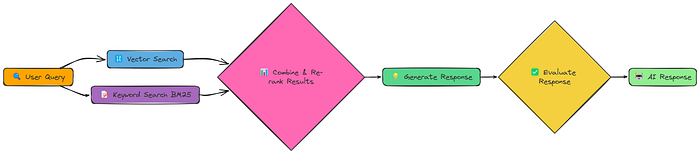
Instead of choosing one retrieval method, Fusion RAG does both, then combines and re-ranks the results. This allows us to capture both semantic meaning and precise keyword matches.
The core of our implementation is the fusion_retrieval function. This function performs both vector-based and BM25-based retrieval, normalizes the scores from each, combines them using a weighted formula and then, ranks documents according to the combined score.
Here is the function of fusion retrieval:
import numpy as np

def fusion_retrieval(query, chunks, vector_store, bm25_index, k=5, alpha=0.5):
    """Perform fusion retrieval by combining vector-based and BM25 search results."""

    # Generate embedding for the query
    query_embedding = create_embeddings(query)

    # Perform vector search and store results in a dictionary (index -> similarity score)
    vector_results = {
        r["metadata"]["index"]: r["similarity"]
        for r in vector_store.similarity_search_with_scores(query_embedding, len(chunks))
    }

    # Perform BM25 search and store results in a dictionary (index -> BM25 score)
    bm25_results = {
        r["metadata"]["index"]: r["bm25_score"]
        for r in bm25_search(bm25_index, chunks, query, len(chunks))
    }

    # Retrieve all documents from the vector store
    all_docs = vector_store.get_all_documents()

    # Compute combined scores for each document using a weighted sum of vector and BM25 scores
    scores = [
        (i, alpha * vector_results.get(i, 0) + (1 - alpha) * bm25_results.get(i, 0))
        for i in range(len(all_docs))
    ]

    # Sort documents by combined score in descending order and keep the top k results
    top_docs = sorted(scores, key=lambda x: x[1], reverse=True)[:k]

    # Return the top k documents with text, metadata, and combined score
    return [
        {"text": all_docs[i]["text"], "metadata": all_docs[i]["metadata"], "score": s}
        for i, s in top_docs
    ]
It takes the best of both approaches:
- Vector Search: Uses our existing create_embeddings and SimpleVectorStore for semantic similarity.
- BM25 Search: Implements a keyword-based search using the BM25 algorithm (a standard information retrieval technique).
- Score Combination: Combines the scores from both methods, giving us a single, unified ranking.
Let's run the complete pipeline and generate response:
# First, process the document to create chunks, vector store, and BM25 index
chunks, vector_store, bm25_index = process_document(pdf_path)

# Run RAG with fusion retrieval
fusion_result = answer_with_fusion_rag(query, chunks, vector_store, bm25_index)
print(fusion_result["response"])

# Evaluate.
evaluation_prompt = f"User Query: {query}\nAI Response:\n{fusion_result['response']}\nTrue Response: {reference_answer}\n{evaluate_system_prompt}"
evaluation_response = generate_response(evaluate_system_prompt, evaluation_prompt)
print(evaluation_response.choices[0].message.content)


### OUTPUT
Evaluation score for AI Response is 0.83
Final score is 0.83.
Fusion RAG often gives us a significant boost because it combines the strengths of different retrieval approaches.
It's like having two experts working together one good at understanding the meaning of the query, and the other good at finding exact matches.
Multi Model
Up until now, we've only dealt with text. But a lot of information is locked up in images, charts, and diagrams. Multi-Modal RAG aims to unlock that information and use it to improve our responses.

The key changes here are:
- Extract Text & Images: We pull out both text and images from the PDF.
- Generate Image Captions: We use an LLM (specifically, a model with vision capabilities) to generate text descriptions (captions) for each image.
- Create Embeddings (Text & Captions): We create embeddings for both the text chunks and the image captions.
- Embeddings model: In this notebook we are using BAAI/bge-en-icl embedding model.
- LLM model: For generating the response and image caption we will use llava-hf/llava-1.5–7b-hf model.
This way, our vector store contains both textual and visual information, and we can search across both modalities.
Here we define the process_document function:
def process_document(pdf_path, chunk_size=1000, chunk_overlap=200):
    """
    Process a document for multi-modal RAG.

    """
    # Create a directory for extracted images
    image_dir = "extracted_images"
    os.makedirs(image_dir, exist_ok=True)

    # Extract text and images from the PDF
    text_data, image_paths = extract_content_from_pdf(pdf_path, image_dir)

    # Chunk the extracted text
    chunked_text = chunk_text(text_data, chunk_size, chunk_overlap)

    # Process the extracted images to generate captions
    image_data = process_images(image_paths)

    # Combine all content items (text chunks and image captions)
    all_items = chunked_text + image_data

    # Extract content for embedding
    contents = [item["content"] for item in all_items]

    # Create embeddings for all content
    print("Creating embeddings for all content...")
    embeddings = create_embeddings(contents)

    # Build the vector store and add items with their embeddings
    vector_store = MultiModalVectorStore()
    vector_store.add_items(all_items, embeddings)

    # Prepare document info with counts of text chunks and image captions
    doc_info = {
        "text_count": len(chunked_text),
        "image_count": len(image_data),
        "total_items": len(all_items),
    }

    # Print summary of added items
    print(f"Added {len(all_items)} items to vector store ({len(chunked_text)} text chunks, {len(image_data)} image captions)")

    # Return the vector store and document info
    return vector_store, doc_info
This function handles the image extraction and captioning, and the creation of a MultiModalVectorStore.
We're making the assumption that image captioning works reasonably well. (In a real-world scenario, you'd want to carefully evaluate the quality of your captions).
Now, let's put it all together with a query:
# Process the document to create vector store. we have a new pdf for this
pdf_path = "data/attention_is_all_you_need.pdf"
vector_store, doc_info = process_document(pdf_path)

# Run the multi-modal RAG pipeline.  This is very similar to before!
result = query_multimodal_rag(query, vector_store)

# Evaluate.
evaluation_prompt = f"User Query: {query}\nAI Response:\n{result['response']}\nTrue Response: {reference_answer}\n{evaluate_system_prompt}"
evaluation_response = generate_response(evaluate_system_prompt, evaluation_prompt)
print(evaluation_response.choices[0].message.content)


### OUTPUT
0.79
We got a score of around 0.79.
Multi-modal RAG has the potential to be very powerful, especially for documents where images contain crucial information. However, it didn't beat the oter techniques that we have seen so far.
Crag
So far, our RAG systems have been relatively passive. They retrieve information and generate a response. But what if the retrieved information is bad? What if it's irrelevant, incomplete, or even contradictory? Corrective RAG (CRAG) tackles this problem head-on.

CRAG adds a crucial step: evaluation. After the initial retrieval, it checks the relevance of the retrieved documents. And, crucially, it has different strategies depending on that evaluation:
- High Relevance: If the retrieved documents are good, proceed as usual.
- Low Relevance: If the retrieved documents are bad, fall back to a web search!
- Medium Relevance: If the documents are okay, combine information from both the document and the web.
This "corrective" mechanism makes CRAG much more robust than standard RAG. It's not just hoping for the best; it's actively checking and adapting.
Let's see how this works in practice. We'll use a function called rag_with_compression for this.
# Run CRAG
crag_result = rag_with_compression(pdf_path, query, compression_type="selective")
This single function call does a lot:
- Initial Retrieval: Retrieves documents as usual.
- Relevance Evaluation: Scores each document's relevance to the query.
- Decision Making: Decides whether to use the document, do a web search, or combine both.
- Response Generation: Generates a response using the chosen knowledge source(s).
And, as always, the evaluation:
# Evaluate.
evaluation_prompt = f"User Query: {query}\nAI Response:\n{crag_result['response']}\nTrue Response: {reference_answer}\n{evaluate_system_prompt}"
evaluation_response = generate_response(evaluate_system_prompt, evaluation_prompt)
print(evaluation_response.choices[0].message.content)


### OUTPUT ###
0.824
We're targeting a score of around 0.824.
CRAG's ability to detect and correct retrieval failures makes it significantly more reliable than standard RAG.
By dynamically switching to web search when necessary, it can handle a wider range of queries and avoid getting stuck with irrelevant or insufficient information.
This "self-correcting" ability is a major step towards more robust and trustworthy RAG systems.
Conclusion
The 18 tested RAG techniques represent diverse approaches to improving retrieval quality, from simple chunking strategies to advanced methods like Adaptive RAG.
While Simple RAG provides a baseline, more sophisticated approaches like Hierarchical Indices (0.84), Fusion (0.83), and CRAG (0.824) significantly outperform it by addressing different aspects of the retrieval challenge.
Adaptive RAG emerged as the top performer (0.86) by intelligently selecting retrieval strategies based on query type, demonstrating that context-aware, flexible systems deliver the best results across diverse information needs.
If you like reading this blog, you can follow me on Medium