


TUTORIAL
Are you curious about how quantum computing works?
You've probably heard about quantum computing.
However, maybe you've never gotten a chance to see how to actually use it. While the underlying mathematics can be intimidating, quantum computing itself is fairly simple to understand.
In this tutorial, I'll walk you through a gentle introduction to using a qubit. You'll see how to create your first quantum computing program that can output numbers.
A bit is precisely zero or one
Let's start with the very basics of how existing computers work today using bits.
A bit is a single piece of data on your computer. It can hold the value of either zero or one. This is the same idea as a light switch that can turn off or on. When the light switch is flipped on, the value of the bit is one. When it's off, the value of the bit is zero.
0 = OFF 1 = ON
This is simple enough. In fact, the computer that you're using right now works using bits.
Four bits to a nibble and two nibbles to a byte
Now, we know that a bit can hold a value of zero or one.
There is not a whole lot that we can do with a single bit of information, aside from turning a switch on or off. However, if we combine four bits together we get a nibble. This extends the range of values that we can represent from just 0 or 1 all the way to 15.
0000 = 0 0001 = 1 0010 = 2 0011 = 3 … 1111 = 15
In a similar fashion, two nibbles equals a byte.
Bytes represent most data on your computer
You've almost certainly heard of the term byte before.
A byte is one of the most common representations of data on your computer. It consists of 8 bits and can represent values all the way from 0 to 255. This includes all of the letters of the alphabet including extended characters and symbols from the ASCII table — ones that you've probably seen used in emojis.
We can do a lot with a byte of data.
0110 0101 = 101 => A 0110 0110 = 102 => B 0110 0111 = 103 => C … 1111 1111 = 255 => ÿ
A qubit is also a bit
In quantum computing, a bit is called a qubit.
We use the term qubit because the value of a single qubit is not just zero or one, but rather zero and one virtually simultaneously! When we perform a calculation on a classical computer, a bit can only hold the value of zero OR one — not both. However, on a quantum computer we can calculate a result with a qubit being both zero and one.
This is a remarkable difference as it makes the processing capabilities of a quantum computer exponential.
Let's make a quantum computing program with one qubit
Now that we understand the power behind a qubit, let's try it out.
I'm going to guide you through using the IBM Quantum Composer to write a quantum computing program using qubits. This is a free online tool that you can use to create your own quantum programs and see how they work.
Let's begin with a simple program to output the number 1.
First Quantum Program: Displaying the value 1
First, navigate to the IBM Quantum Composer to begin creating a new program. You should see the following user interface.
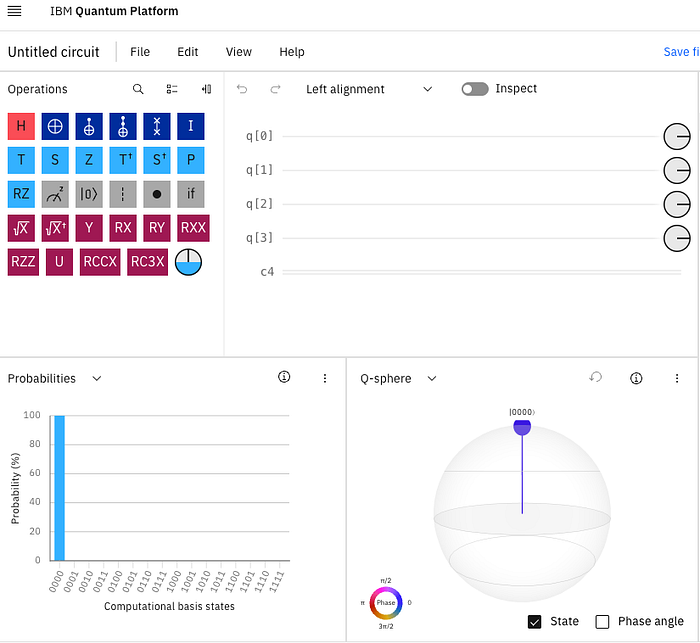
Now, we only want to use a single qubit, so let's remove everything except one qubit. You can do this by clicking on q[3] and selecting the trash icon to delete the qubit. Repeat this for q[2] and q[1]. You should now be left with a single qubit named q[0].
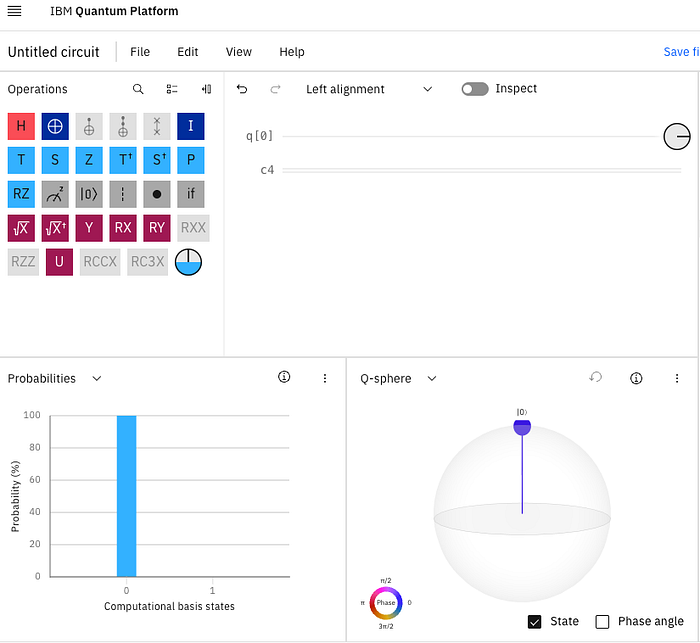
Don't worry about the line named c4 just yet (these are classical registers, but we will not be using here).
Measuring a value of zero
You may have noticed the blue bar along the bottom-left of the screen, which represents the value from your quantum computing program.
When you first initialize a qubit, it has the value 0. Therefore, the result of the entire program is just an output of 0. You can see this in the blue bar, since it is currently at 100% probability of outputting a zero.
Of course, we want our program to output a one.
Flipping the qubit
To have our quantum computing program output a one, we need to flip the value of the qubit.
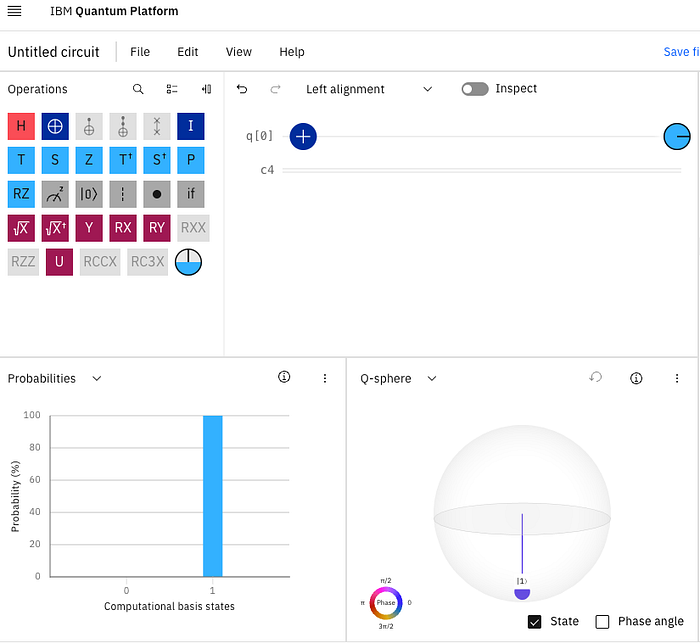
Just like a light switch, we can flip the qubit's value by using an inverse operator. This is also called a NOT gate. To do this, drag the picture of the plus sign with a circle over to the line labeled q[0] and drop it there.
When you do this, you should immediately see the result of your program change from outputting 0 to now outputting a 100% probability of 1.
Second Quantum Program: Displaying the value 2
So far, we've created a quantum program that can output the value 1 by using a single qubit.
Let's try using two qubits this time to output the value 2. Start by clicking on the qubit name q[0] and then clicking the plus sign to add another qubit. After doing this, you should see the probabilities chart change from just showing 0 or 1 to now showing 00, 01, 10, 11.
The program is showing the outputs for all four states because two qubits can represent 4 different states virtually simultaneously.
Convert from binary to qubits
We need to do a tiny bit of math to output the value 2.
Since we are using a qubit to represent a bit and we need at least two bits to represent the value 2 (10), we will need to change our operators in our program.
Right now, we're outputting a value of 1. This is because we have a NOT operator on the right-most bit, flipping it from 0 to 1, resulting in the binary value 01 which equals 1 in decimal.
To make this represent the value 2 in decimal, we need the binary value to be 10 which equals 2 in decimal.
Moving the NOT operator
Click on the NOT operator on our first qubit q[0] and drag it down to the second line named q[1].
This effectively moves the inverse operator from the first qubit onto the second qubit. You should see the probabilities chart change from displaying the binary value 01 (1) with 100% probability to now displaying 10 (2).
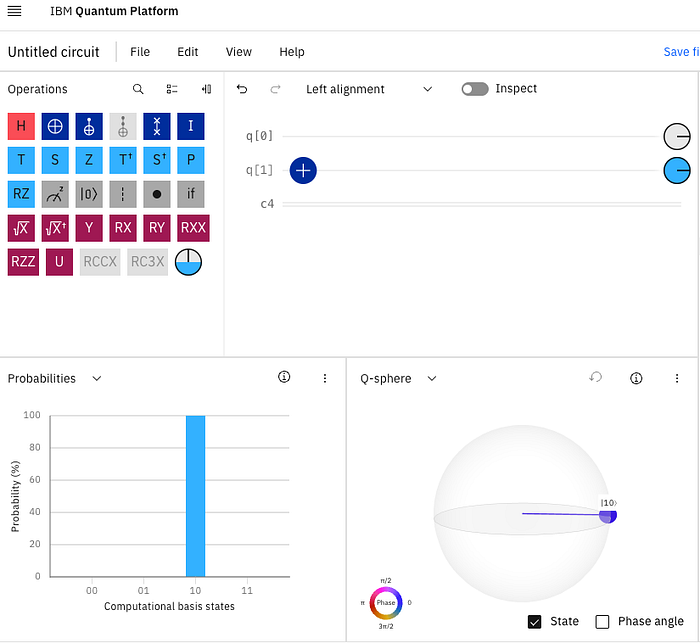
We now successfully have a quantum computing program outputting a value of 2.
Third Quantum Program: Displaying the value 2 and 3 at the same time
Our final example really puts quantum computing to good use. We're going to output the value 2 and 3 simultaneously.
Representing multiple values in a single computation is exactly what quantum computing excels at. We're going to do this right now by updating our program to output both the values 2 and 3 at the same time with equal probability.
We're going to use superposition for this.
Introducing superposition for a qubit
Superposition lets us place a qubit into an equal probability of outputting a zero or a one.
We can use this to our advantage. Remember that the binary value 10 equals 2 in decimal and the binary value 11 equals 3. Since we want our program to output both a 2 and 3 at the same time, we just need the left-most bit to always hold a value of 1 and the right-most bit to be 0 and 1 (at the same time).
10 = 2 11 = 3 ^ — The right-most bit is either 0 or 1.
Let's use the power of quantum computing to do this!
Putting a qubit into superposition
The Hadamard gate places a qubit into superposition so that it can hold a value of both zero and one.
We need to represent the binary values 10 (2) and 11 (3). Notice, while the left-most bit is always 1, the right-most bit changes depending if we want to show a 2 or 3. Therefore, we can put the right-most qubit into superposition so that it outputs both a 0 and a 1, while the left-most qubit stays the same.
Drag the red H operator from the toolkit and drop it onto the qubit line named q[0].
Checking for success
After putting the first qubit into superposition, you should see the probability chart update.
Instead of just showing a single value with probability of 100%, we are now outputting two values, each with a probability of 50%. Half the time our program will output the value 2, while the other half of the time it will output 3.
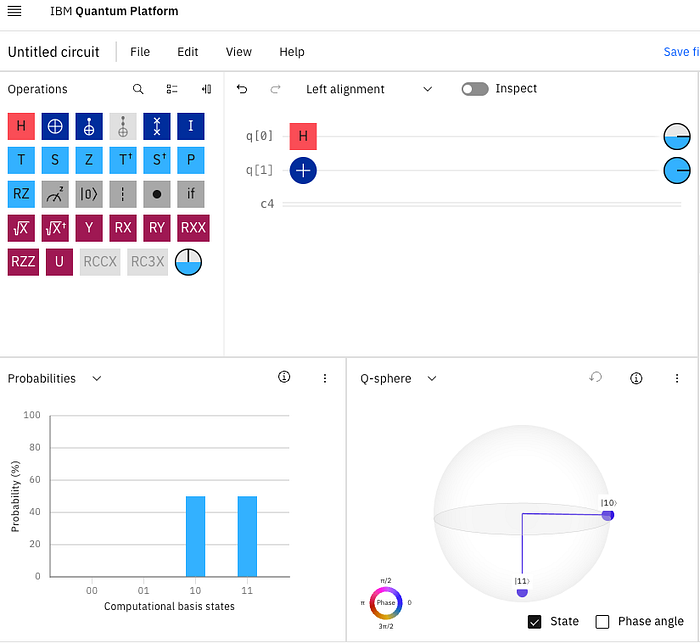
We now have a quantum computing program using two qubits to output the values 2 and 3 at the same time.
This is just the beginning
In this tutorial, we've learned what a qubit is and how it differs from a classical bit.
We've seen how to create a working quantum computing program using an online tool, including executing the program to output a result. We've also seen how to represent binary values using qubits. Finally, we learned how to leverage the full power of quantum computing using superposition to write a program that outputs two values at the same time.
Of course, this is just the beginning.
What kind of quantum program would you like to create?
About the author
If you've enjoyed this article, please consider following me on Medium, Bluesky, LinkedIn, and my website to be notified of my future posts and research work.