
1.Abstract
The international version of ZoomEye [1] completed a comprehensive integration with DeepSeek [2] on December 11, 2024, and simultaneously launched the new domain "zoomeye.ai". ZoomEyeGPT, the intelligent search tool introduced by ZoomEye's international version, has lowered the barrier for users to write search syntax and enhanced the precision of searches and user experience by integrating DeepSeek. DeepSeek's powerful context comprehension enables ZoomEye to accurately interpret user intentions, even if users are not familiar with search syntax and standards. The system can capture key information and precisely locate user query needs.
In fact, DeepSeek can be applied not only to the input side of ZoomEye searches but also to the output side of ZoomEye results. By leveraging DeepSeek's AI capabilities, it assists users in interpreting ZoomEye result data to improve the efficiency of data analysis and understanding.
This article, based on ZoomEye and DeepSeek, shares methods and tips for intelligent searching and data result parsing using ZoomEye. First, we use multiple field values from ZoomEye data results to identify the organization to which the corresponding IP belongs using DeepSeek's intelligent labeling and recognition. When DeepSeek's results are inaccurate, we can attempt to use its online search function. DeepSeek performs real-time queries, reading and thinking through relevant materials to provide more reasonable answers. Finally, we use ZoomEyeGPT, the intelligent search tool launched by ZoomEye's international version, to search for IP assets of specific organizations using natural language.
2.Overview
The search syntax standards of multiple global cyberspace search engines (e.g., ZoomEye/Shodan/Censys) vary greatly, causing users distress. Without familiarity with the search syntax standards, users cannot quickly write search queries to describe their needs.
ZoomEyeGPT is an AI-powered tool specifically designed to enhance cyberspace asset searches. By integrating DeepSeek, it addresses the challenges users face when navigating ZoomEye's search syntax. Whether you're a system administrator, an academic researcher, a network technology enthusiast, or a cybersecurity beginner, ZoomEyeGPT provides tailored syntax recommendations based on your needs. By reducing the learning curve, streamlining complex operations, and simplifying the search process, it makes powerful network exploration accessible to all.
ZoomEye platform's network asset data contains a variety of fields. By examining certain field values, we can label and identify the organization to which the IP asset belongs, such as the SSL certificate information used by the IP asset, the banner information of the mail service provided by the IP asset, and the hostname information of the IP asset. Manual labeling and identification are inefficient, so we attempt to use DeepSeek to label and identify ZoomEye result data to improve the efficiency of data analysis and understanding.
3.Identification of IP Affiliated Institutions
In this section, we use the web version of DeepSeek [3] and take multiple field information as examples to share methods and tips for labeling and identifying ZoomEye result data to obtain the organization to which the IP belongs.
3.1 SSL Certificate
An SSL certificate is a digital certificate used to authenticate the identity of a website and enable encrypted connections. It creates an encrypted link between a web server and a web browser and generally follows the X.509 format standard. The Subject field in the SSL certificate information is used to identify the certificate holder's information and usually contains the following common attributes:
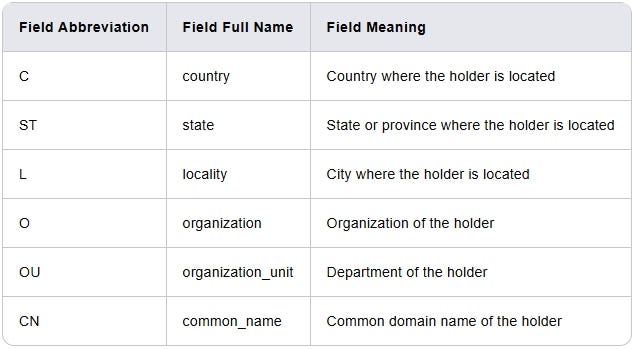
We use the official IBM website as an example. The values of the Subject field in the website's SSL certificate information are shown in the following table. The value of field O is "International Business Machines Corporation," and the value of field CN is "www.ibm.com."
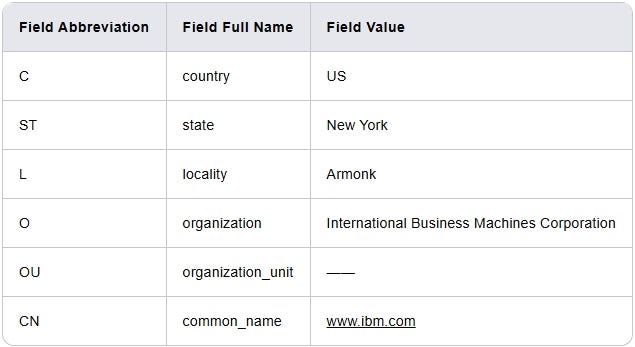
From these fields of the SSL certificate, we can determine that the certificate holder is "International Business Machines Corporation," and thus we can infer that the network asset using this SSL certificate belongs to the "International Business Machines Corporation."
In this section, we attempt to use DeepSeek to analyze the SSL certificate information of IP assets on the ZoomEye platform and label the organization to which the IP asset belongs.
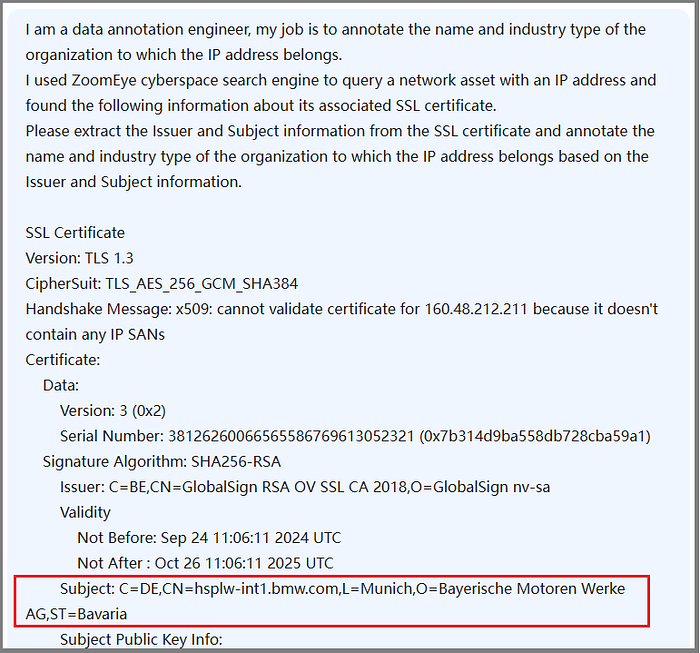
We inform DeepSeek of the background information: "I am a data annotation engineer, and my job is to annotate the name and industry type of the organization to which the IP address belongs. I used the ZoomEye cyberspace search engine to query a network asset with an IP address and found the following information about its associated SSL certificate. Please extract the Issuer and Subject information from the SSL certificate and annotate the name and industry type of the organization to which the IP address belongs based on the Issuer and Subject information."
We then send the SSL certificate information of the IP address 160.48.212.211 asset data queried from the ZoomEye platform to DeepSeek.
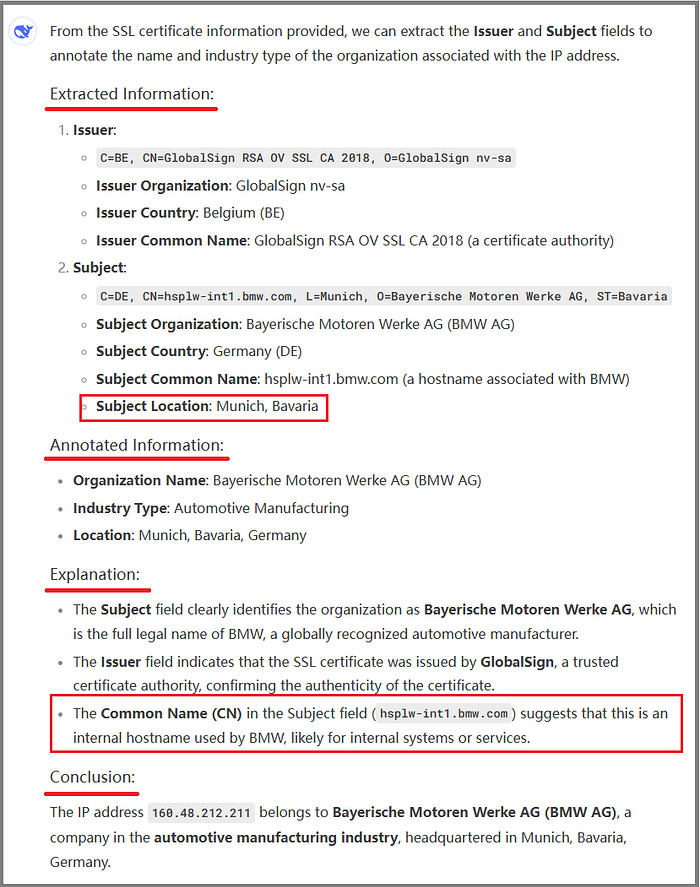
From DeepSeek's response, we see that DeepSeek did four things:
- Extracted Information: In accordance with the prompt, DeepSeek extracted the values of the Issuer and Subject fields from the SSL certificate data and further understood and extracted the values of the next-level fields. There is a small detail here: DeepSeek combined the values of the L and ST fields under the Subject field to display as Location, indicating that DeepSeek has a thorough understanding of the field meanings.
- Annotated Information: DeepSeek annotated the information from the previous step, which was an easy task for it.
- Explanation: DeepSeek provided some explanations, which were actually part of its extended thinking process. Its understanding of the Common Name (CN) field was also correct.
- Conclusion: DeepSeek made a concise summary of the results. DeepSeek's conclusion was correct.
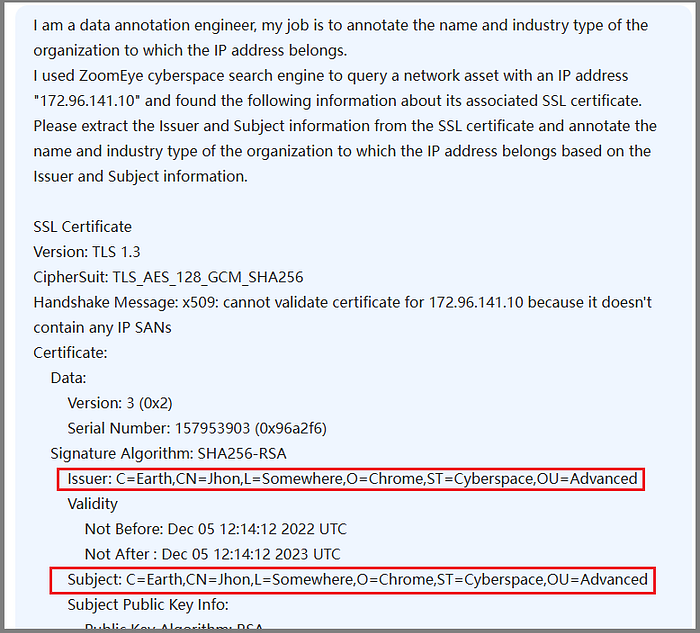
Next, we try a more challenging example by sending a self-signed certificate to DeepSeek, as shown in the following figure.
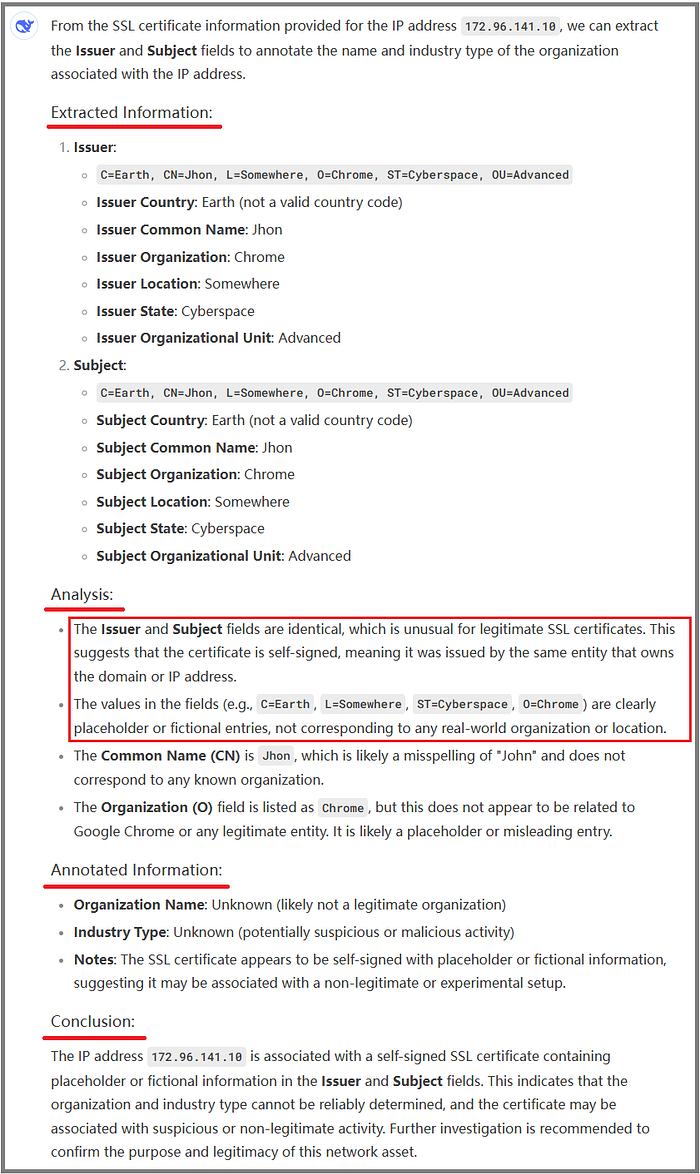
DeepSeek performed well and made an accurate judgment: "The Issuer and Subject fields are identical; it is self-signed. The values in the fields are fictional entries and do not correspond to any real-world organization or location."
Although the value of the O field in the Subject field of the SSL certificate is Chrome, DeepSeek did not associate the certificate with Google Chrome.
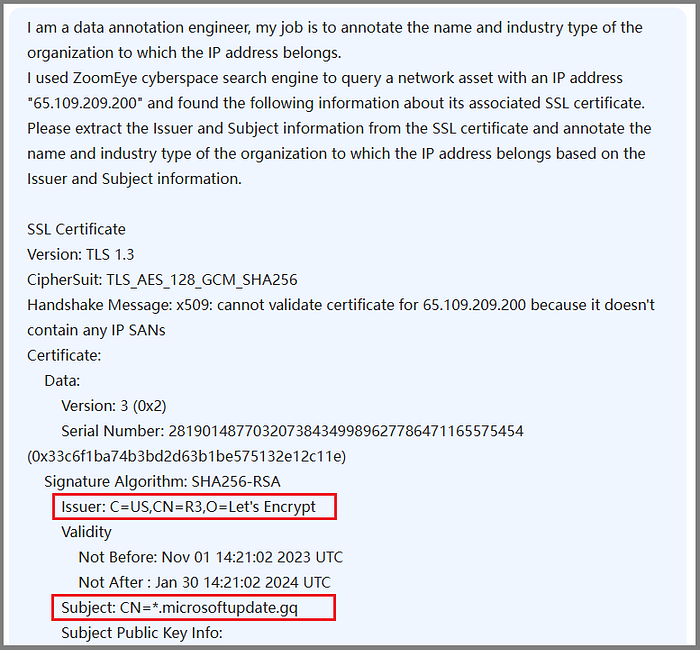
Next, we continue with another challenging example by sending a certificate containing a malicious domain to DeepSeek. The certificate was issued by the free certificate authority "Let's Encrypt," and the certificate information is shown in the following figure. The Common Name field of the certificate is "*.microsoftupdate.gq," which is used to impersonate Microsoft's update service domain.
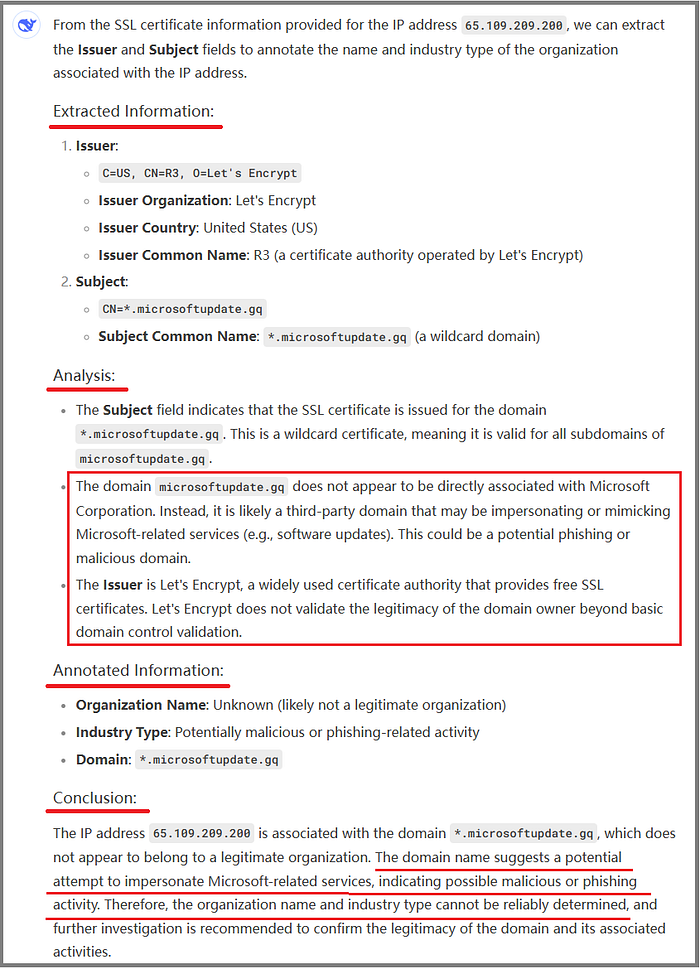
Based on the SSL certificate information and its own cybersecurity knowledge, DeepSeek analyzed and judged that: "The domain microsoftupdate.gq does not appear to be directly associated with Microsoft Corporation. Instead, it is likely a third-party domain that may be impersonating or mimicking Microsoft-related services (e.g., software updates). This could be a potential phishing or malicious domain."
Finally, DeepSeek provided a relatively accurate conclusion: "The IP address is associated with the domain *.microsoftupdate.gq, which does not appear to belong to a legitimate organization. The domain name suggests a potential attempt to impersonate Microsoft-related services, indicating possible malicious or phishing activity. Therefore, the organization name and industry type cannot be reliably determined, and further investigation is recommended to confirm the legitimacy of the domain and its associated activities."
3.2 Hostname
In IP asset data, the hostname field represents the hostname associated with a specific IP address, commonly used to identify the device's name in the network. Therefore, the value of the hostname field can reflect the organization to which the IP asset belongs.
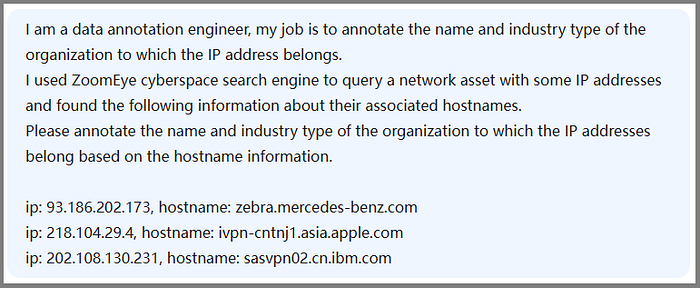
In this section, we attempt to use DeepSeek to analyze the hostname information of IP assets on the ZoomEye platform and label the organization to which the IP asset belongs.
We inform DeepSeek of the background information: "I am a data annotation engineer, and my job is to annotate the name and industry type of the organization to which the IP address belongs. I used the ZoomEye cyberspace search engine to query network assets with some IP addresses and found the following information about their associated hostnames. Please annotate the name and industry type of the organization to which the IP addresses belong based on the hostname information."
We then send the hostname information of three IP address assets queried from the ZoomEye platform to DeepSeek.
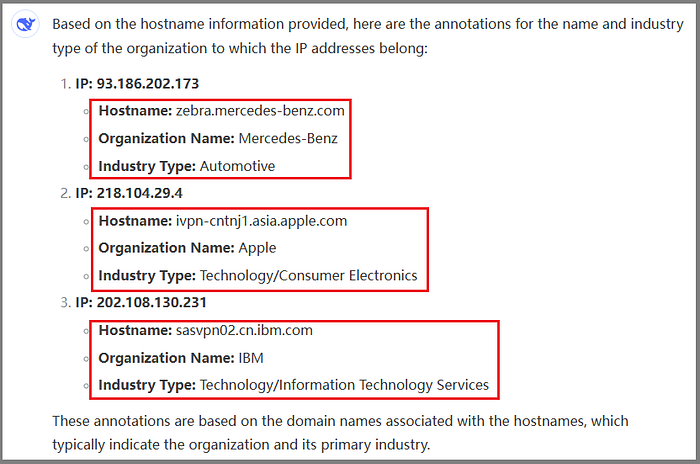
DeepSeek should be quite adept at handling information labeling in this scenario, providing concise and accurate conclusions without much analysis. The organizations to which the three IPs belong are: Mercedes-Benz, Apple, and IBM.
3.3 Banner
In IP asset data, the Banner field typically represents the banner information (Banner Information) obtained from network services or devices. These pieces of information are text data actively sent by devices or services upon establishing a connection, used to identify themselves or provide relevant information. For certain services, such as SMTP services, the banner information may contain organizational domain information, which can reflect the organization to which the IP asset belongs.
In this section, we attempt to use DeepSeek to analyze the Banner information of IP assets on the ZoomEye platform and label the organization to which the IP asset belongs.
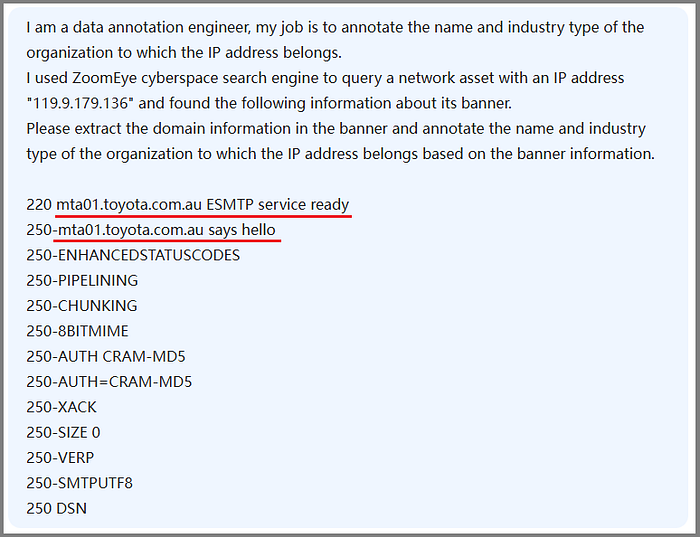
We inform DeepSeek of the background information: "I am a data annotation engineer, and my job is to annotate the name and industry type of the organization to which the IP address belongs. I used the ZoomEye cyberspace search engine to query a network asset with an IP address and found the following information about its banner. Please extract the domain information in the banner and annotate the name and industry type of the organization to which the IP address belongs based on the banner information."
We then send the SMTP service banner information of the IP address 119.9.179.136 asset data queried from the ZoomEye platform to DeepSeek.
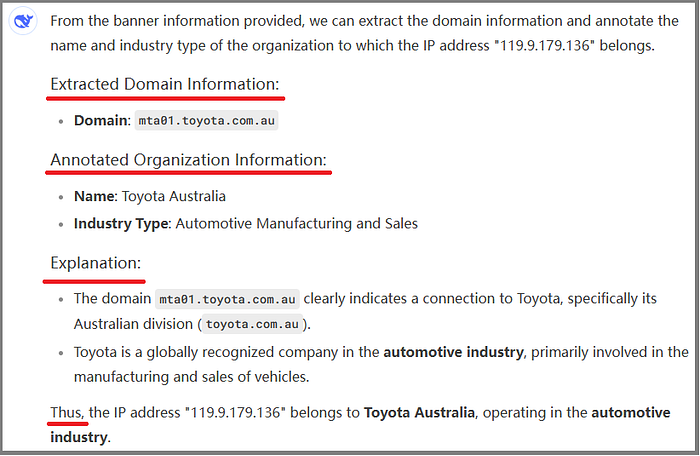
DeepSeek first extracts the domain "mta01.toyota.com.au" from the banner information, then annotates the domain and supplements the annotation process and rationale. In this case, DeepSeek not only labels the organization to which the IP belongs as "Toyota" but also identifies it as the "Australian division of Toyota" based on the domain suffix.
3.4 Organization
In the IP asset data on the ZoomEye platform, the Organization field is used to represent the organization to which the IP belongs. However, when the value of the Organization field corresponds to a telecommunications operator or cloud service provider, we cannot determine that the IP belongs to that organization, nor can we label the actual user of the IP.
In this section, we attempt to use DeepSeek to analyze the Organization field values of IP assets on the ZoomEye platform, label the organization to which the IP asset belongs, and determine whether it is the actual user of the IP.
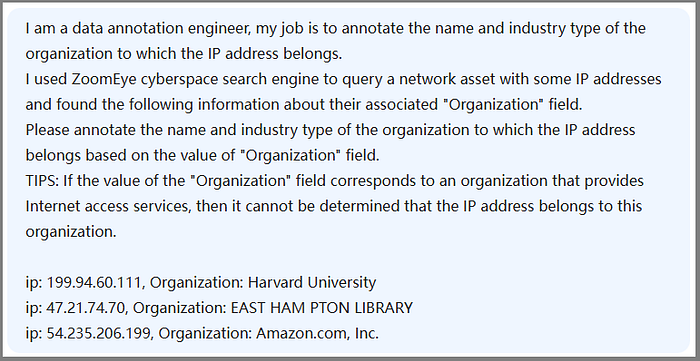
We inform DeepSeek of the background information: "I am a data annotation engineer, and my job is to annotate the name and industry type of the organization to which the IP address belongs. I used the ZoomEye cyberspace search engine to query network assets with some IP addresses and found the following information about their associated 'Organization' field. Please annotate the name and industry type of the organization to which the IP address belongs based on the value of the 'Organization' field. TIPS: If the value of the 'Organization' field corresponds to an organization that provides Internet access services, then it cannot be determined that the IP address belongs to this organization."
We then send the Organization field information of three IP address assets queried from the ZoomEye platform to DeepSeek.
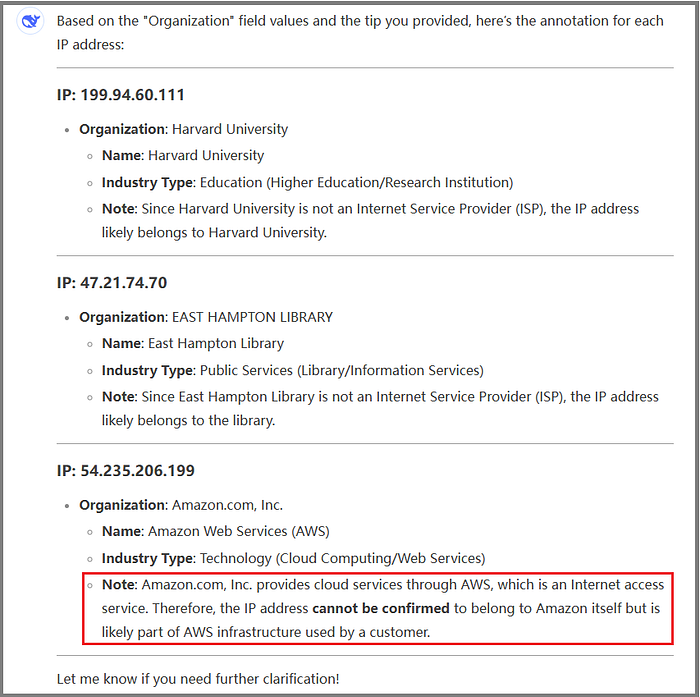
The values of the Organization field in the ZoomEye platform's result data are already in natural language that humans can understand, making it easier for DeepSeek to process and provide the names and industry types of the organizations to which the three IPs belong. When analyzing the third IP data, based on the knowledge that Amazon provides cloud services through AWS, DeepSeek provides a reasonable conclusion: "The IP address cannot be confirmed to belong to Amazon itself but is likely part of the AWS infrastructure used by a customer."
4.DeepSeek's Online Search Functionality
When using DeepSeek to analyze ZoomEye result data to obtain the organization to which the IP asset belongs, we sometimes encounter inaccurate results.
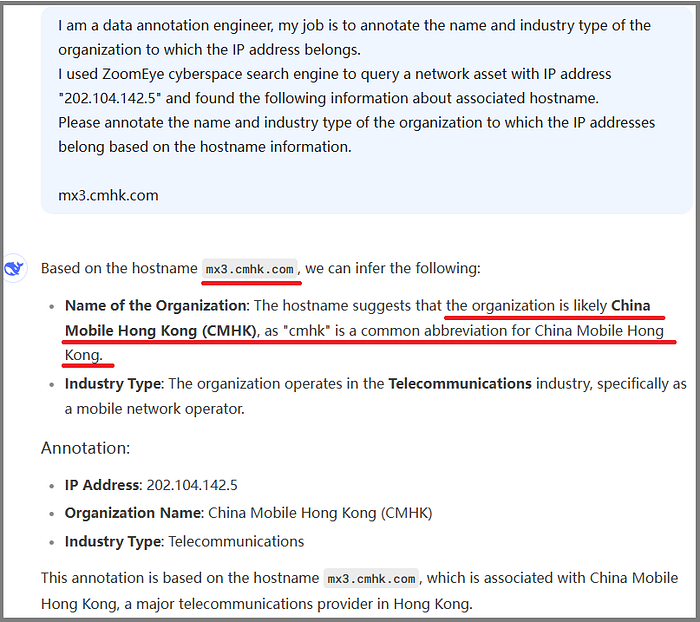
As shown in the figure above, the hostname information of the IP address "202.104.142.5" is "mx3.cmhk.com." When DeepSeek annotated this information, it concluded that "cmhk" is a common abbreviation for China Mobile Hong Kong, and thus labeled the organization of the domain "mx3.cmhk.com" as "China Mobile Hong Kong."
In reality, the organization to which the domain "mx3.cmhk.com" belongs is "China Merchants Group," and the official domain name of this organization is "cmhk.com."
Other large models also make the same mistake when processing this example, and it is speculated that this error is caused by the training data corpus.
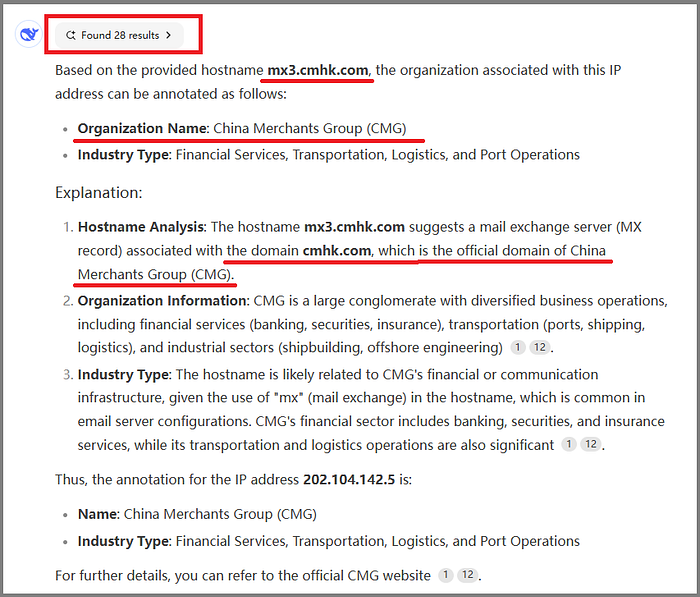
Next, we attempt to use DeepSeek's online search functionality to correct this error. On the web version of DeepSeek, we check the "Online Search" option and use the same prompt. DeepSeek then provides the correct conclusion, as shown in the following figure.
When the "Online Search" option is checked, DeepSeek queries relevant information on the Internet, reads and thinks through the materials, and summarizes a more reasonable answer. Additionally, DeepSeek explains in its response why it adopts certain search results. For example, in this case, DeepSeek's rationale is "the domain cmhk.com, which is the official domain of China Merchants Group (CMG)."
From this example, we find that when DeepSeek provides inaccurate results, we can try using its online search functionality. DeepSeek can rely not only on pre-trained data but also perform real-time queries, reading and thinking through relevant materials to summarize a more reasonable answer.
5.Searching for Organizational IP Assets
ZoomEyeGPT, the intelligent search tool introduced by ZoomEye's international version, lowers the barrier for users to write search syntax. Even if users are not familiar with the search syntax and standards, the system can capture key information and precisely locate user query needs.
Based on the intelligent identification methods and tips for IP ownership described in the previous sections, we use ZoomEyeGPT to search for IP assets belonging to specific organizations.
Taking "Harvard University" as an example, we enter the following natural language in the ZoomEyeGPT Search Syntax box:
"Search for assets belonging to 'Harvard University.'"
ZoomEyeGPT immediately converts this into search syntax that complies with ZoomEye standards:
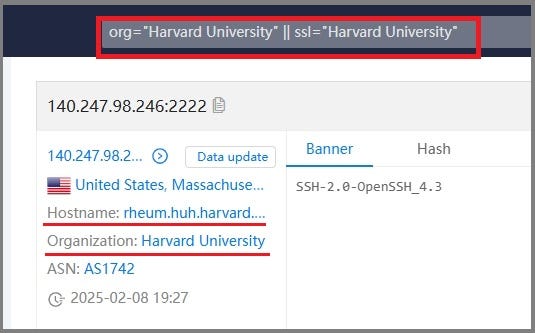
org="Harvard University" || ssl="Harvard University"
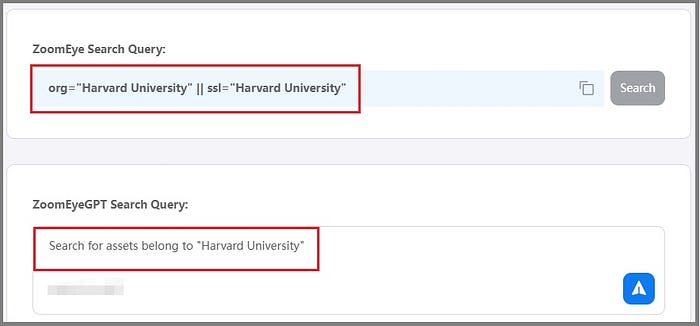
By clicking the "Search" button, we can query IP assets belonging to "Harvard University" on ZoomEye, as shown in the following figure.
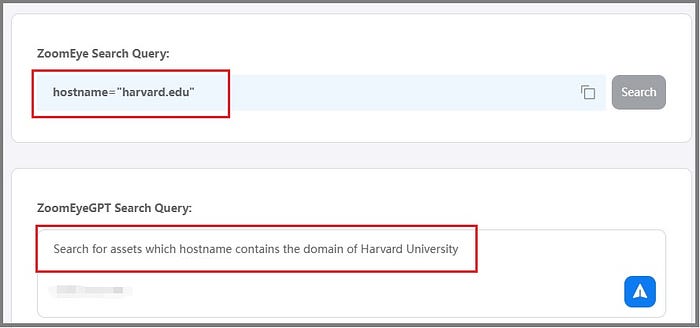
The hostname field value of the IP asset data can reflect the organization to which the IP belongs. Therefore, we enter the following natural language in the ZoomEyeGPT Search Syntax box:
"Search for assets whose hostname contains the domain of Harvard University."
ZoomEyeGPT immediately converts this into search syntax that complies with ZoomEye standards:
hostname="harvard.edu"
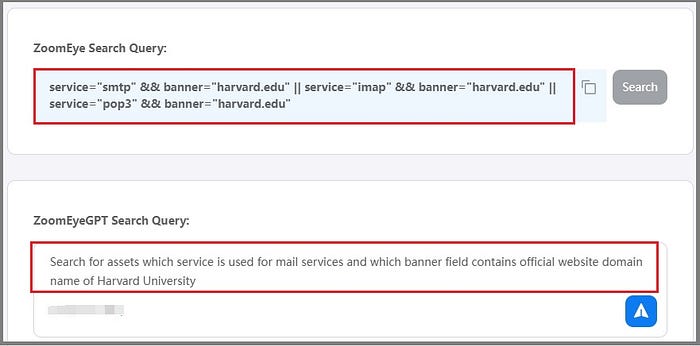
The banner field value of the IP asset data for mail services can also reflect the organization to which the IP belongs. Therefore, we enter the following natural language in the ZoomEyeGPT Search Syntax box:
"Search for assets whose service is used for mail services and whose banner field contains the official website domain name of Harvard University."
ZoomEyeGPT immediately converts this into search syntax that complies with ZoomEye standards:
service="smtp" && banner="harvard.edu" || service="imap" && banner="harvard.edu" || service="pop3" && banner="harvard.edu"
6.Conclusion
Based on ZoomEye and DeepSeek, this article shares methods and tips for intelligent searching and data result parsing using ZoomEye.
First, we used the web version of DeepSeek to label and identify the organization to which the IP belongs based on the SSL Certificate, Hostname, Banner, and Organization field values of IP assets in ZoomEye result data. DeepSeek handled these tasks with ease, correctly understanding field meanings, extracting key information, and labeling the organization to which the IP belongs.
If we find that DeepSeek's conclusions are incorrect due to issues with the training data corpus, we can try using its online search functionality. DeepSeek can rely not only on pre-trained data but also perform real-time queries, reading and thinking through relevant materials to summarize a more reasonable answer.
Then, we used ZoomEyeGPT, the intelligent search tool introduced by ZoomEye's international version, to search for IP assets belonging to specific organizations. Taking "Harvard University" as an example, we entered natural language in the search box, and ZoomEyeGPT immediately converted it into search syntax that complies with ZoomEye standards. After searching, we obtained IP assets belonging to "Harvard University."
7.References
[1] ZoomEye International Version
[2] DeepSeek
[3] DeepSeek Web Version