
Introduction
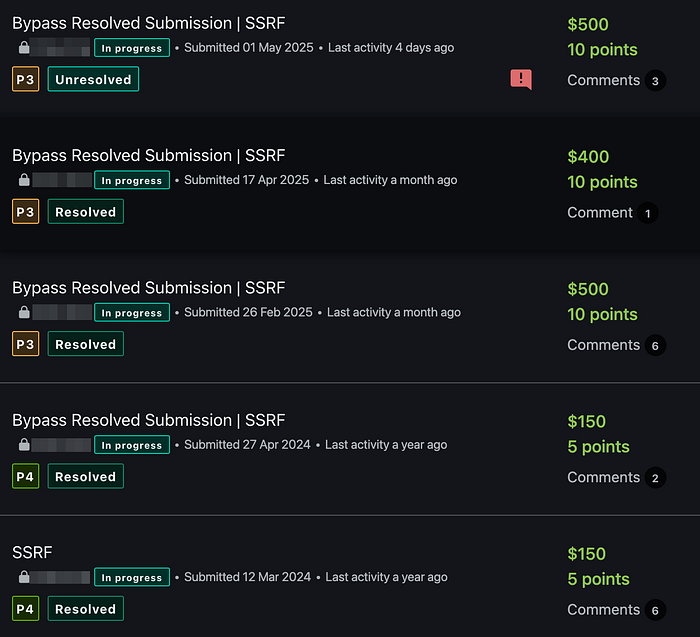
In this article, I'll walk through a server-side request forgery (SSRF) vulnerability I discovered during my individual research, demonstrating how I was able to exploit it using five different techniques. For each bypass, I'll share the logic behind the attack, the reward it led to, and how the corresponding defensive fix fell short.
What Is SSRF and Why Should It Be Taken Seriously?
Server-Side Request Forgery (SSRF) is a critical security vulnerability that occurs when a web application's server makes unauthorized requests to internal or external systems based on untrusted input, typically due to overly permissive or unvalidated URL handling.
The cases I present in this write-up are examples of Blind SSRF, meaning that I couldn't see the content of the server's response. However, by analyzing response timing, delay patterns, and success or failure behavior, I was still able to assess system behavior and exploit the vulnerability effectively, despite the lack of direct data leakage.
Below is a proof of reward that confirms the success of these exploit attempts:
Technique #1: Basic Localhost Port Scanning
When integrating with e-commerce platforms like WooCommerce, the application prompts the user to provide a shop_Url. This parameter is then passed directly to the server, which makes an HTTP request without any prior validation. The purpose is to verify whether the provided store URL is functional.
The server attempts to reach the WooCommerce REST API by sending a request such as:
GET http://<shop_Url>/wp-json/wc/v1Vulnerability Background
The submitted shop_Url is used directly without any IP validation or hostname filtering. This allows an attacker to target loopback addresses such as 127.0.0.1, effectively tricking the server into making requests to internal services.
How Was the Port Scan Performed?
When the server initiates an HTTP request, an open port allows the connection to be established instantly, resulting in a fast response. If the port is closed, the server attempts to connect, waits, and eventually times out.
This behavior enables timing-based port scanning:
- shop_Url: 127.0.0.1:80 → fast response (port is open)
- shop_Url: 127.0.0.1:79 → delayed or no response (port is closed)
By measuring these differences in response time, it's possible to infer which ports on the internal network are open.
HTTP Request
The following request is used to initiate the WooCommerce integration. When a target like 127.0.0.1:79 is provided, the server internally makes an HTTP request to that address.
POST /api/graphql HTTP/2
Host: redacted.com
Cookie: session_id=<SESSION_ID>;
User-Agent: k4yra
Content-Type: application/json

{
  "operationName": "ConnectWoocommerce",
  "variables": {
    "shop_Url": "127.0.0.1:80"
  },
  "query": "mutation ConnectWoocommerce($shop_Url: String!) {\n  connectChannel(shop_Url: $shop_Url)\n}"
}
In this example, when the shop_Url parameter is set to 127.0.0.1:79, the server behaves as follows:
- GET http://127.0.0.1:79/wp-json/wc/v1 → timeout (port is closed)
- GET http://127.0.0.1:80/wp-json/wc/v1 → fast response (port is open)
Outcome
- Root Cause: Direct access allowed without IP or port filtering
- Impact: Enabled port scanning on internal services
- Result: First bounty successfully earned
Estimated Fix & Why It Was Insufficient?
if "127.0.0.1" in shop_Url or "localhost" in shop_Url:
    raise ValidationError("Access to localhost is not allowed.")
This fix most likely relied on blocking obvious string patterns like "127.0.0.1" and "localhost". However, it failed to cover the entire loopback range (127.0.0.0/8), allowing easy bypasses using alternatives like 127.0.1.3.
Technique #2: SSRF to Localhost via CIDR Bypass
After the first technique, the system owners likely implemented a blacklist for classic loopback addresses like 127.0.0.1. However, this kind of filtering only blocks explicitly written IPs and may overlook alternatives within the same IP block.
In this scenario, the address 127.0.1.3 was used. Technically, it belongs to the 127.0.0.0/8 loopback range and is treated as a local address. But because the system only blocked 127.0.0.1, this variation slipped through unnoticed.
Technical Background
The same WooCommerce integration scenario applies here. The user-supplied shop_Url is sent to the backend via a GraphQL mutation, as shown below:
POST /api/graphql HTTP/2
Host: redacted.com
Cookie: session_id=<SESSION_ID>;
User-Agent: k4yra
Content-Type: application/json

{
  "operationName": "ConnectWoocommerce",
  "variables": {
    "shop_Url": "127.0.1.3:80"
  },
  "query": "mutation ConnectWoocommerce($shop_Url: String!) {\n  connectChannel(shop_Url: $shop_Url)\n}"
}
Once the server receives this request, it performs the following internal HTTP call:
GET http://127.0.1.3:80/wp-json/wc/v1Port Scanning Behavior
- If port 80 is open → the server responds quickly
- If port 79 is tested → the server times out
This timing difference allows an attacker to bypass the blacklist and perform another round of internal port scanning.
Why This Technique Worked?
- The application applied filtering specifically for 127.0.0.1 only
- 127.0.1.3, although within the same CIDR block, was overlooked
- No proper CIDR-based comparison was made (e.g., using inet_pton and netmasking)
- The fix addressed the symptom, but not the root cause
Outcome
- Root Cause: Filtering was applied to fixed IP values without CIDR awareness
- Impact: The same vulnerability became exploitable again using an alternative IP
- Result: Second bounty successfully earned
Estimated Fix & Why It Was Insufficient?
import ipaddress
ip = ipaddress.ip_address(shop_Url.split(":")[0])
if ip in ipaddress.ip_network("127.0.0.0/8"):
    raise ValidationError("Access to loopback range is not allowed.")
This attempted improvement still failed due to lack of normalization, leaving the door open for octal representations.
Technique #3: IP Bypass via Octal Format
After the use of 127.0.1.3 in the second technique, the system likely tried to block the entire 127.0.0.0/8 range. However, another critical detail was overlooked: some backend systems resolve IP addresses written in octal format back to 127.0.0.1. This is a well-known method for bypassing SSRF filters.
Technical Background
- Standard IP: 127.0.0.1
- Octal representation: 0177.0000.0000.0001
When interpreted numerically:
- 0177 = 127
- 0001 = 1
Thus, the backend IP resolution library understands this as 127.0.0.1. However, since string comparisons are used for validation, "0177.0000.0000.0001" != "127.0.0.1", which allows the bypass.
HTTP Request
POST /api/graphql HTTP/2
Host: redacted.com
Cookie: session_id=<SESSION_ID>;
User-Agent: k4yra
Content-Type: application/json

{
  "operationName": "ConnectWoocommerce",
  "variables": {
    "shop_Url": "0177.0000.0000.0001:80"
  },
  "query": "mutation ConnectWoocommerce($shop_Url: String!) {\n  connectChannel(shop_Url: $shop_Url)\n}"
}
Once the server receives this request, it generates the following internal call:
GET http://0177.0000.0000.0001:80/wp-json/wc/v1However, technically, this is equivalent to:
GET http://127.0.0.1:80/wp-json/wc/v1meaning the IP resolves to the same loopback address.
How Was the Port Scan Performed?
- When port 80 is open → a fast response is received
- When port 79 is closed → the request is delayed or times out
This timing behavior allows the attacker to infer the state of the port.
Why This Technique Worked?
- The system performed string-based IP checks and failed to detect octal variants
- The IP parsing library correctly resolved the octal format as 127.0.0.1
- The security control was limited to a blacklist on "127.0.0.1" and did not normalize input before evaluation
Outcome
- Root Cause: IP comparisons were performed without normalization
- Impact: The same loopback IP could be used for SSRF via an alternative notation
- Result: The third bounty was earned using this technique
Estimated Fix & Why It Was Insufficient?
import socket

try:
    normalized_ip = socket.gethostbyname(shop_Url.split(":")[0])
    if normalized_ip.startswith("127."):
        raise ValidationError("Access to loopback IPs is not allowed.")
except Exception:
    raise ValidationError("Invalid IP format.")
This fix likely aimed to resolve and normalize the IP address before checking for loopback access. However, blocking only IPs starting with "127." is insufficient. Even if the server correctly interprets the IP, as long as the user's original input is directly used in the request, other SSRF techniques (like chained open redirects) remain viable. The next method demonstrates how this behavior was exploited.
Technique #4: Chaining SSRF via Open Redirect
After the previous bypasses, the application had blocked 127.0.0.1, 127.0.1.3, and octal-formatted IPs. This time, a different strategy was employed: exploiting an external open redirect endpoint to perform SSRF.
The goal was to make the server believe the target URL was safe, while secretly redirecting it to an internal resource.
Technical Background
The shop_Url parameter provided by the user was set to:
http://307.r3dir.me/--to/?url=http://localhost:80Although this URL appeared harmless at first glance, 307.r3dir.me was an open redirect service. When the server made a request to this address, it was automatically redirected to http://localhost:80.
HTTP Request
POST /api/graphql HTTP/2
Host: redacted.com
Cookie: session_id=<SESSION_ID>;
User-Agent: k4yra
Content-Type: application/json

{
  "operationName": "ConnectWoocommerce",
  "variables": {
    "shop_Url": "http://307.r3dir.me/--to/?url=http://localhost:80"
  },
  "query": "mutation ConnectWoocommerce($shop_Url: String!) {\n  connectChannel(shop_Url: $shop_Url)\n}"
}
The server, upon receiving this request, performs the following steps:
- The server makes a GET http://307.r3dir.me/... request
- A 3xx redirection response is received → Location: http://localhost:80
- The server follows the redirect without validation
- Result: Access to localhost:80 is achieved → the SSRF chain is completed successfully
Port Scanning
When a port number is appended to the redirect target, the same timing-based port scanning logic can be applied:
- http://307.r3dir.me/--to/?url=http://localhost:80 → fast response
- http://307.r3dir.me/--to/?url=http://localhost:79 → timeout
Using this difference, open ports can once again be identified.
Why This Method Worked?
- An HTTP client that follows redirects is used (e.g., requests, axios, http.client)
- The backend follows the Location header without inspecting its destination
Outcome
- Root Cause: Chained internal service access via open redirect
- Impact: Internal IP access, port scanning
- Result: Fourth bounty successfully earned
Estimated Fix & Why It Was Insufficient?
import ipaddress
import socket
import requests

final_url = requests.get(shop_Url, allow_redirects=True, timeout=2).url
ip = socket.gethostbyname(urlparse(final_url).hostname)
if ipaddress.ip_address(ip) in ipaddress.ip_network("127.0.0.0/8"):
    raise ValidationError("Redirected destination is loopback. Blocking.")
This fix likely attempted to resolve the final destination of the redirected URL and apply a filter if it fell within the loopback IP range (127.0.0.0/8).
However, only the loopback block was checked. Since other internal ranges like 169.254.169.254 (metadata service) or 10.0.0.0/8 were not included, the attacker was able to redirect the server to those internal resources in the next step.
Technique #5: SSRF to Metadata Service and Internal IP Ranges
After the open redirect bypass, defenders likely tried to block localhost, 127.0.0.1, and possibly redirect chains. However, this time the attacker broadened the target: AWS metadata service and internal network ranges.
The goal was not just to access localhost, but any internal IP blocks, especially 169.254.169.254, 10.0.0.0/8, 172.31.0.0/16, and 192.168.0.0/16. These ranges are commonly used for EC2 metadata access, IAM roles, and VPC services.
Technical Background
This time, the attacker supplied the following value in the shop_Url parameter:
http://307.r3dir.me/--to/?url=http://169.254.169.254At a glance, this URL appears safe, as it includes a trusted-looking domain like r3dir.me. However, this domain performs an open redirect, causing the server to ultimately access http://169.254.169.254 the AWS metadata endpoint.
HTTP Request
POST /api/graphql HTTP/2
Host: redacted.com
Cookie: session_id=<SESSION_ID>;
User-Agent: k4yra
Content-Type: application/json

{
  "operationName": "ConnectWoocommerce",
  "variables": {
    "shop_Url": "http://307.r3dir.me/--to/?url=http://169.254.169.254"
  },
  "query": "mutation ConnectWoocommerce($shop_Url: String!) {\n  connectChannel(shop_Url: $shop_Url)\n}"
}
The server receives this request and performs the following steps:
- GET http://307.r3dir.me/... → a 302 redirect is returned
- Location: http://169.254.169.254 → the server follows the redirect
- Access to the metadata endpoint is established
Network Scanning Details
Using the same technique, the attacker can also scan other internal networks:
- http://169.254.169.254 → metadata endpoint
- http://10.0.0.1:80, http://172.31.22.1:443 → VPC IPs
- http://192.168.1.1:8080 → local network IPs
Open ports respond quickly; closed ones cause a timeout → this timing difference enables effective internal port scanning.
Why This Method Worked?
- The blacklist was limited to addresses like localhost and 127.0.0.1
- Internal IP ranges like 169.254.169.254 and 10.x.x.x were overlooked
- Redirects were still followed without proper validation
Outcome
- Root Cause: Failure to filter internal IP blocks and uncontrolled follow of redirects by the server
- Impact: Redirection to the EC2 metadata service was successful. Although the response content wasn't visible, timing and behavioral differences confirmed that the server processed the request
- Result: The fifth bounty was earned by successfully verifying access through blind SSRF
Conclusion and Recommendations
In this blog post, I detailed how the same SSRF vulnerability was repeatedly exploited using five different techniques, each one approaching the issue from a unique angle to craft new bypasses. The common thread across all cases was clear: while the vulnerability was patched on a technical level, it was never addressed at the architectural level.
General Observations
- All SSRF cases were of the blind SSRF type. Although the server's response content was not directly visible, system behavior could be analyzed based on timing differences, success/failure patterns, and connection delays.
- The vulnerability existed because the application passed user-supplied URLs directly to the backend HTTP client without proper validation.
- Each bypass attempt exploited the shortcomings of the previous patch or leveraged asymmetrical filtering logic (e.g., blocking 127.0.0.1 but overlooking 127.0.1.3).
- The server-side redirect-following mechanism allowed requests to be chained from external URLs to internal resources.
- IP validation was limited to simple string comparisons. Since IPs were not normalized before evaluation, techniques like octal notation, redirects, and targeting internal IP blocks were able to bypass the filters.
Recommendations for Security Researchers
- Never assume a vulnerability is fully mitigated just because a patch was deployed. Revisit it from different angles such as alternative encodings, new IP representations, open redirects, or chained attack paths.
2. In blind SSRF scenarios, focus on behavioral differences like:
- Open port → fast response
- Closed port → timeout or delayed response
3. In AWS environments, access to 169.254.169.254 always poses a high risk. Even without leaking IAM roles, successful access to this endpoint can have serious implications.
4. Try to understand the architecture behind a vulnerability. Don't just focus on payloads, target the underlying logic and system behavior.
Final Thoughts
It's often assumed that a single SSRF vulnerability can only be exploited once. However, as demonstrated in this write-up, with careful analysis, patience, and creative exploration, the same flaw can be exploited multiple times using different techniques.
This article serves as a strong counterexample to the mindset of "once it's patched, it's over." In security, one fundamental principle holds true: Mitigating symptoms without addressing the root behavioral cause is never enough.
If you'd like to discuss these techniques or collaborate on similar research:
LinkedIn: https://www.linkedin.com/in/kayra-öksüz-ab061a1ba/