

Why do we need this ?
How often did you want your ffuf directory busting or LFI fuzzing to go through Burpsuite so that you can analyze each request and response, make changes and possibly do other attacks? Well this is the solution!
Before starting out, I would like to address other options of doing it:
- Burpsuite Intruder: We can do the same thing using burpsuite intruder and check every HTTP request and response. However intruder is slow when you are using the free version of Burpsuite.
- Ffuf alternative: There are other tools like gobuster, dirsearch as an alternative to Ffuf. However ffuf is really fast compared to them and the most feature heavy!
In order to utilize the speed of Ffuf and have the ability to look at all individual HTTP requests and responses from Burpsuite can really help in enumerations like LFI/RFI. You can filter responses in burpsuite better. Look at each request and make smaller tweaks by sending them to repeater.
How to do this ?
There are two ways of going at it.
- Using ffuf command line option that lets you choose a proxy. But this one has been historically buggy with me. Sometimes the proxy works and redirects my stuff to burpsuite, sometimes it doesn't.
- Configure burpsuite proxy and redirect ffuf to burpsuite and then burpsuite to target.
Let's take a look at the 2nd way that I like the most.
Idea is simple. We first make sure that Burpsuite is proxying all traffic thrown at it to our target website. There we need to configure correct target host IP and port. Then we point ffuf to burpsuite and run the scan. This way first ffuf sends the traffic to burpsuite and then burpsuite redirects them to our target listing every request and response in Burpsuite.
Configuring BurpSuite
- Open up Burpsuite. Go to Proxy -> Intercept → Proxy Settings.
- From there all current proxies would be listed. Select the one that you want to work with. Hit Edit.
- While Editing, put target IP as recirect to host and target Port as Redirect to Port.
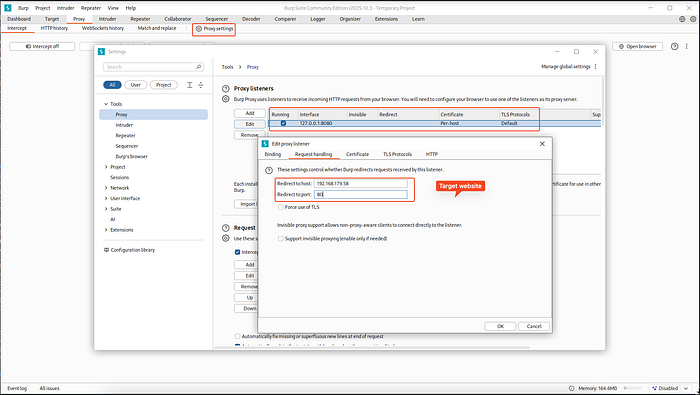
Now BurpSuite has been configured to send everything that it gets to our target website.
You can make additional changes like using TLS depedning on your need.
Configure Ffuf
It's fairly simple. We just need to put in the url so that it points to Burpsuite instead of the actual target machine. For example, the target is sitting at 192.168.179.58:80. And Burpsuite is hosted at my localhost 127.0.0.1:8080. So I'll attack the localhost.
ffuf -u http://127.0.0.1:8080 <rest-of-the-command>Results
Now whatever requests Ffuf sent, Burpsuite would get populated with that. You can find them in the HTTP History tab.
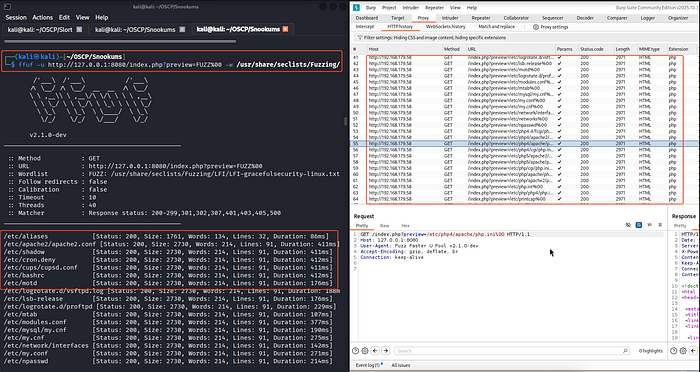
You can look at the request, response. Send them to repeater to make small tweaks. Congratulations! You have just used fast ffuf with greater analysis inside BurpSuite.
